
Presentations have changed a lot over the past few years. Whether you’re pitching an idea to investors, teaching students in a classroom, or presenting a marketing strategy to clients, simply showing information on slides is no longer enough. Audiences are exposed to content everywhere, which means keeping their attention has become more challenging than ever.
This is why storytelling-driven presentations are becoming increasingly popular across business, education, and marketing. Instead of overwhelming viewers with unreasonable amount of text, these presentations focus on creating an experience. They guide audiences through a story, build emotional connection, and make information easier to remember long after the presentation ends.
One approach that has gained significant attention is the cinematic presentation. In this blog, we’ll take a look at what cinematic presentations are, why they work so well, and how you can create one for your next presentation.
What Is a Cinematic Presentation?
A cinematic presentation is a slide deck designed to feel more like a movie than a traditional presentation. Instead of relying heavily on bullet points and dense text, it uses visual storytelling, large imagery, smooth motion, dramatic layouts, and carefully planned pacing to guide the audience through a story. The goal is to create an emotional connection while making information easier to understand and remember.
Why Cinematic Presentations Work
Cinematic presentations have become popular because they help audiences connect with information on a deeper level. Here are some of the reasons they work so well.
1. Makes Presentations More Memorable
People tend to remember stories and visuals more than lists of facts. Cinematic presentations create moments that stick with the audience long after the presentation ends. By combining imagery, movement, and storytelling, information becomes easier to recall.
2. Improves Storytelling Flow
Traditional presentations sometimes feel disconnected, with each slide acting as a separate piece of information. Cinematic presentations create a smoother journey by connecting slides through narrative structure, making it easier for audiences to follow the message from beginning to end.
3. Helps Simplify Complex Ideas Visually
Some concepts are difficult to explain through text alone. Visual storytelling allows you to show ideas rather than simply describe them. Images, animations, diagrams, and visual metaphors can make complicated information much easier to understand.
4. Creates a Premium and Professional Brand Impression
A well-designed cinematic presentation immediately feels polished and intentional. The combination of consistent design, strong visuals, and professional storytelling can help strengthen your brand image and leave a positive impression on clients, stakeholders, or customers.
5. Keeps Audiences Engaged From Start to Finish
Maintaining attention is one of the biggest challenges during any presentation. Large blocks of text and repetitive slide designs can quickly cause audiences to lose focus.Cinematic presentations introduce visual variety and movement throughout the deck. Combined with a clear narrative structure, this helps keep viewers engaged and interested in what comes next.
Common Characteristics of a Cinematic Presentation
While cinematic presentations can look different depending on the audience and purpose, they often share several common elements.
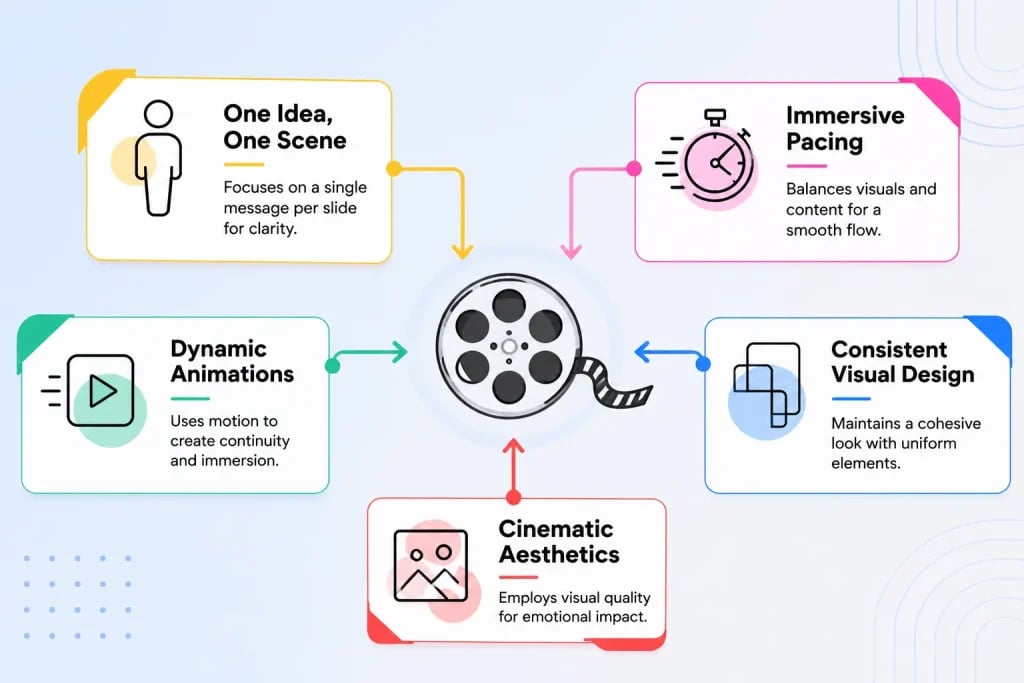
1. One Idea, One Scene Rule
Think of every slide as a scene in a movie. Instead of placing multiple ideas on one slide, focus on a single message. This keeps slides clean and helps the audience focus on what matters most at that moment.
2. Dynamic Animations
Motion plays an important role in cinematic presentations. Smooth transitions, subtle movement, and carefully timed animations help create a sense of continuity between slides and make the presentation feel more immersive.
3. Cinematic Aesthetics
Visual quality matters. Cinematic presentations often feature full-screen images, clean layouts, minimal text, dramatic contrast, and carefully selected typography. These elements work together to create a stronger emotional impact.
4. Consistent Visual Design
Consistency helps maintain the illusion of a cohesive story. Using the same fonts, color palette, image style, and design language throughout the presentation creates a polished and professional viewing experience.
5. Immersive Pacing
Good cinematic presentations pay close attention to timing. The pace of the visuals, animations, and spoken content should work together to guide the audience through the story without feeling rushed or repetitive.
How to Make a Cinematic Presentation?
Creating a cinematic presentation involves more than simply adding animations. It requires a combination of storytelling, design, and audience engagement techniques. Here’s a closer look at some tips that can help you get started:
1. Build a Strong Storyline
Every great movie starts with a strong story, and cinematic presentations are no different. Create a clear beginning, middle, and ending that guides your audience through the information. Start by introducing the problem or opportunity, build toward insights or solutions, and finish with a memorable conclusion that reinforces your message.
2. Design Visual-First Slides
Instead of filling slides with paragraphs of text, focus on visuals that communicate ideas quickly. High-quality images, illustrations, icons, and videos can often explain concepts more effectively than lengthy explanations. Let visuals carry most of the storytelling whenever possible.
3. Use a Cinematic Design Style
Choose a design style that supports the mood of your presentation. Dark backgrounds, bold typography, dramatic imagery, and strong visual contrast can help create a cinematic feel. At the same time, keep layouts clean so that important messages remain easy to understand.
4. Add Smooth Transitions and Motion
Transitions should feel natural rather than distracting. Features like Morph transitions, zoom effects, and subtle animations can help create seamless movement between slides.
5. Create Emotional Engagement
People remember presentations that make them feel something. Use visuals, storytelling, pacing, and real-world examples to create emotional moments throughout your presentation. This helps audiences connect more deeply with your message.
6. Enhance Slides With Sound
When appropriate, background music, ambient audio, or subtle sound effects can strengthen the overall experience. Sound can help set the mood, emphasize important moments, and make presentations feel more immersive. Just be careful not to overpower the content itself.
7. Master Presentation Timing
Even the best-designed slides can fall flat if timing is off. Practice synchronizing your narration, pauses, transitions, and animations. Proper timing allows important moments to land more naturally and helps maintain audience engagement throughout the presentation.
Create Cinematic Presentations Faster With SlidesAI
Building a cinematic presentation from scratch can take hours. You need to create content, structure the story, design slides, choose visuals, and maintain consistency across the entire deck. This is where SlidesAI can help.
SlidesAI allows you to turn scripts, prompts, notes, or outlines into presentation slides automatically. Instead of spending time manually creating every slide, you can focus on developing your story while the platform handles much of the design work.
The platform can generate visually appealing slide layouts that follow a consistent design style throughout your presentation. This helps maintain visual flow and reduces the effort required to format slides individually.
Whether you’re creating presentations for business meetings, classroom lessons, marketing campaigns, or client pitches, SlidesAI can significantly speed up the creation process. It helps reduce repetitive design work so you can spend more time refining your message and storytelling.
If your goal is to create cinematic presentations without spending countless hours on formatting and slide design, SlidesAI offers a much faster and more efficient workflow.
Start creating cinematic presentations with SlidesAI’s Presentation Maker and transform your ideas into visually engaging stories in minutes.
How to Create Cinematic Presentations With SlidesAI?
To start creating cinematic presentations with SlidesAI we recommend you to follow these steps:
1. Log in to SlidesAI
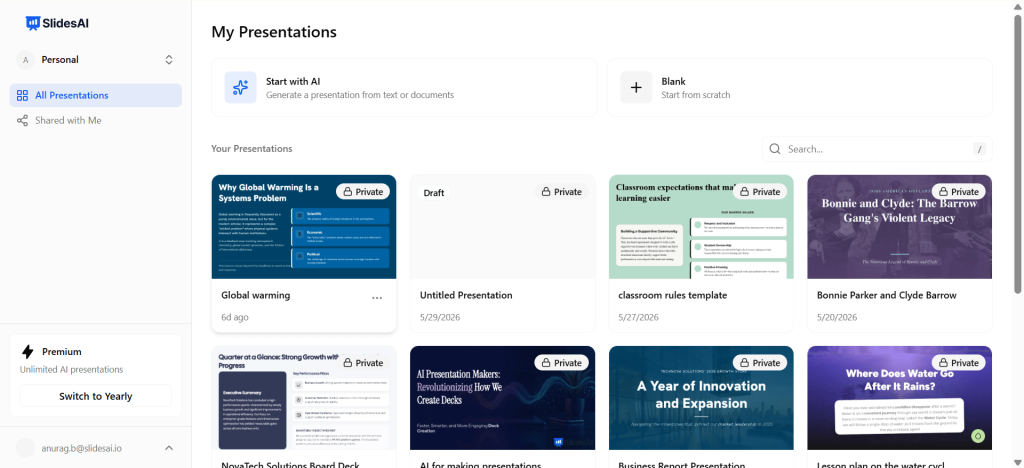
Visit app.slidesai.com or install the SlidesAI add-on for Google Slides or PowerPoint to get started.
2. Add Your Presentation Content
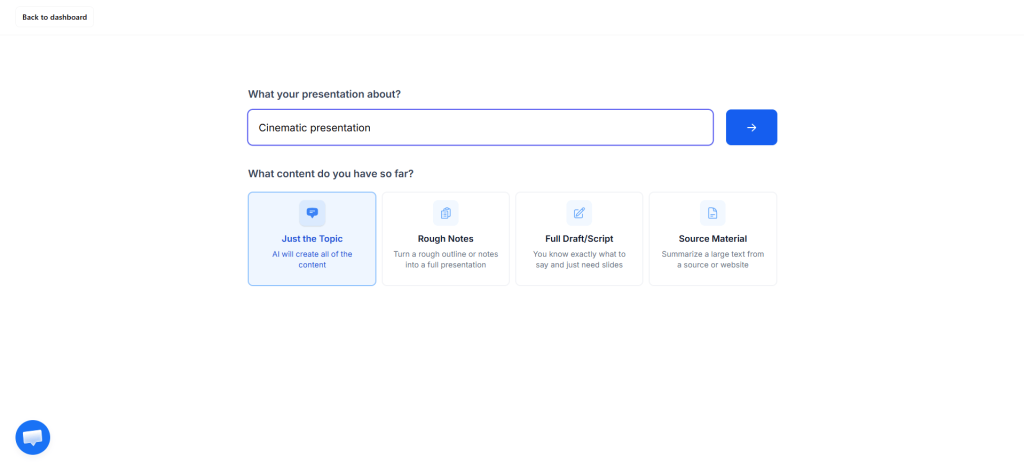
Enter what your presentation is about and choose the type of content you currently have available:
3. Customize Presentation Settings
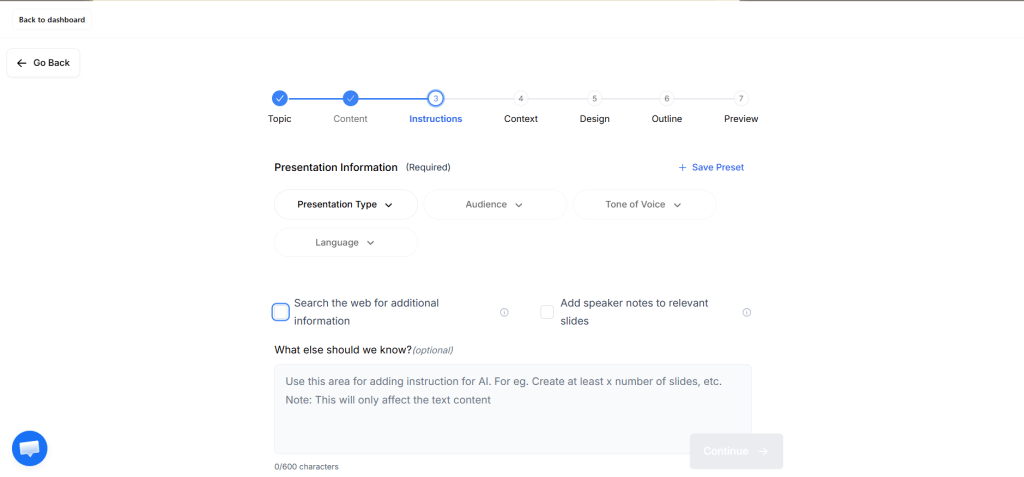
Select your presentation type, target audience, tone of voice, and language. You can also choose whether you want speaker notes, AI-assisted web research, and any custom instructions.
4. Choose Presentation Mode
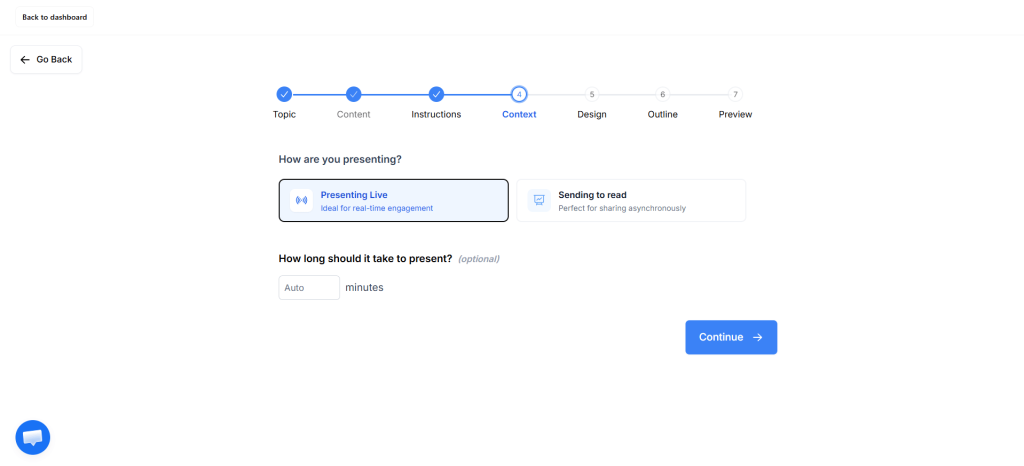
Specify whether you’ll be presenting live to an audience or sharing the presentation for people to read on their own.
5. Add Design Preferences
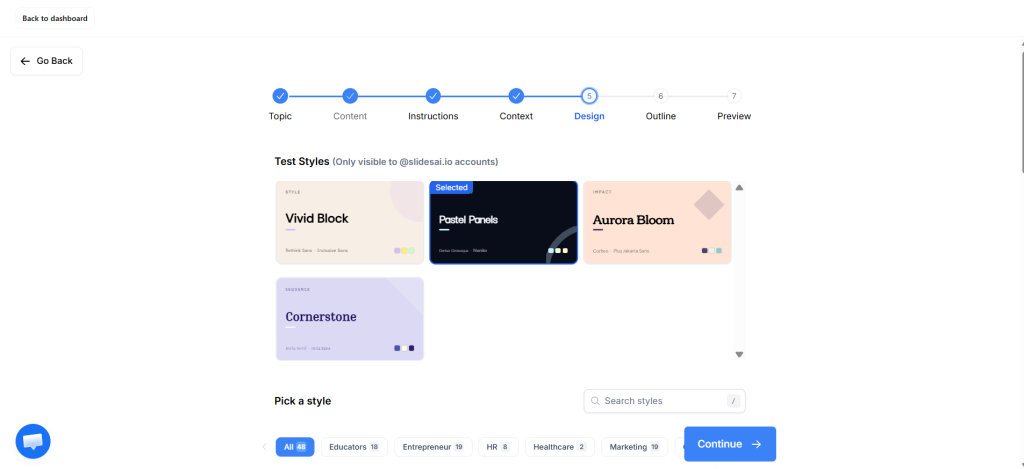
Customize visual elements including text styles, design templates, logos, image frequency, and image sources to match the cinematic look you’re aiming for.
6. Review the Generated Outline
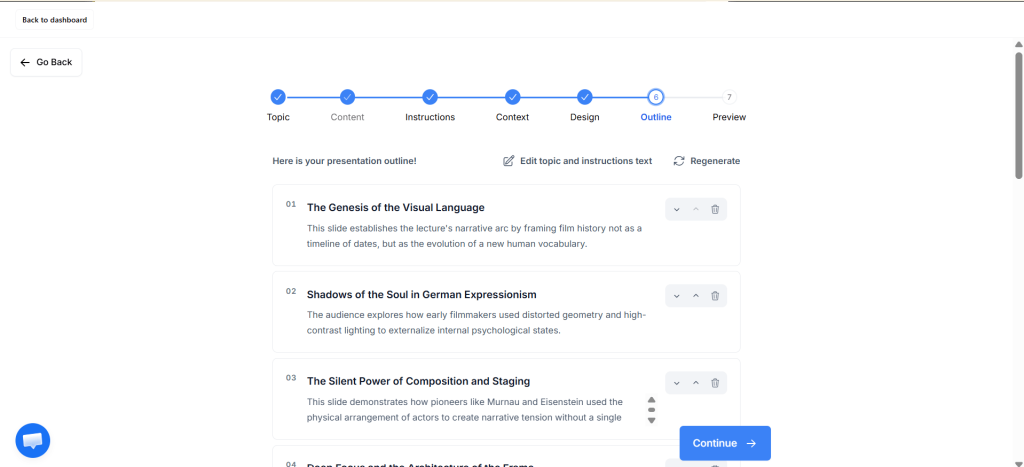
SlidesAI will generate a presentation outline based on your input. Review the structure and make adjustments if necessary before proceeding.
7. Finalize and Edit Your Presentation
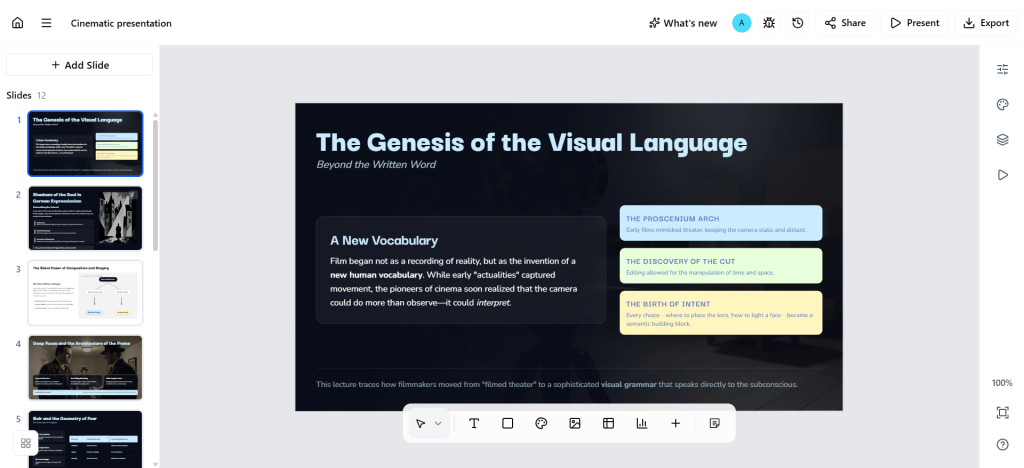
Once the complete presentation is generated, review each slide, refine content, adjust visuals, and make any final improvements before presenting.
Create Presentations in Minutes With SlidesAI
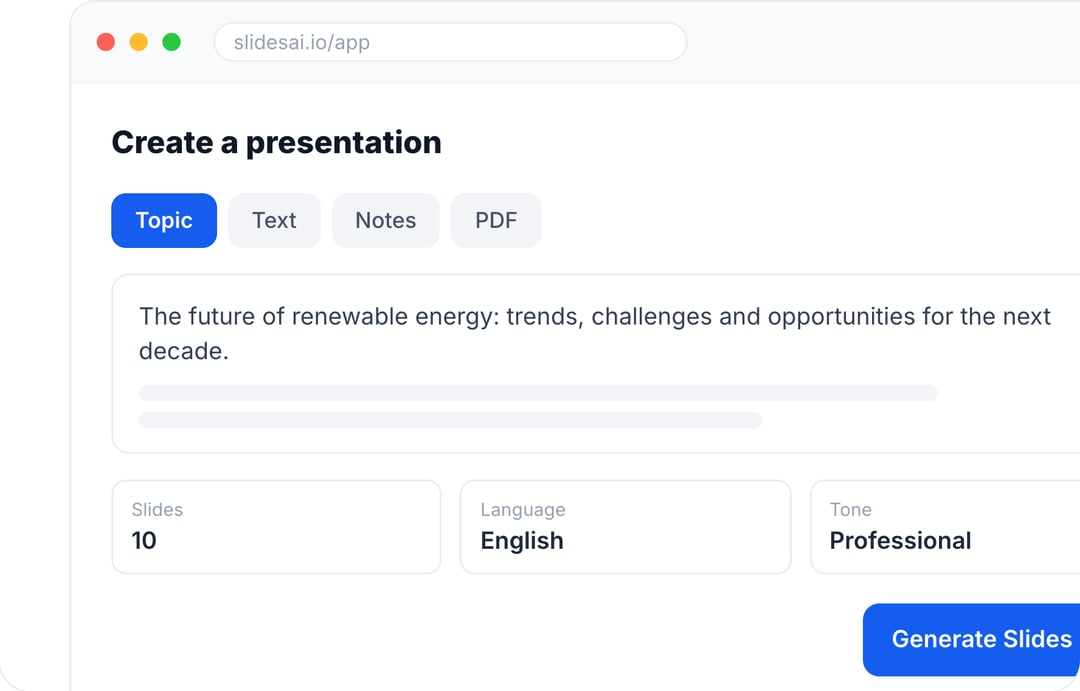
- Start with a topic, text, notes, or PDF
- Generate slides in minutes
- Customize your presentation with ease
Closing Thoughts
Cinematic presentations go beyond simply sharing information. They create experiences that audiences can follow, connect with, and remember. By combining storytelling, visuals, motion, and thoughtful pacing, you can transform ordinary slides into presentations that hold attention from beginning to end.
The good news is that you do not need to be a professional designer to create them. With the right approach and tools like SlidesAI, building cinematic presentations becomes faster, easier, and much more accessible. Focus on the story you want to tell, and let your slides help bring that story to life.
Create stunning cinematic presentations in minutes using professionally designed templates that make slide creation fast and effortless.
FAQs
1. What makes a presentation cinematic?
A cinematic presentation uses storytelling, high-quality visuals, smooth transitions, minimal text, and carefully planned pacing to create an immersive experience. Instead of focusing on bullet points, it guides the audience through a narrative similar to a movie.
2. What is the difference between a cinematic presentation and a traditional presentation?
Traditional presentations primarily focus on delivering information through text and bullet points, while cinematic presentations prioritize storytelling, visuals, emotion, and audience engagement. They aim to create a memorable experience rather than simply display information.
3. Which presentation software is best for creating cinematic presentations?
Popular tools include Google Slides, Microsoft PowerPoint, Canva, Keynote, and AI-powered presentation makers like SlidesAI. Features such as Morph transitions, animations, full-screen visuals, and AI-generated designs make it easier to achieve a cinematic look.
4. How many words should a cinematic presentation slide contain?
Most cinematic slides work best with very little text, typically between 5 and 20 words. The visuals should communicate the main message while the presenter provides additional context through narration.
5. Can I create a cinematic presentation without animation?
Yes. While animations can improve the viewing experience, strong storytelling, impactful visuals, thoughtful layouts, and effective pacing can still create a cinematic presentation without excessive motion effects.
6. How can AI help create cinematic presentations?
AI presentation tools can generate slide structures, design layouts, recommend visuals, and maintain design consistency automatically. This reduces manual formatting and allows creators to focus on storytelling and presentation delivery.
7. Are cinematic presentations suitable for business presentations?
Yes. Cinematic presentations are commonly used for investor pitches, product launches, marketing presentations, sales decks, keynote speeches, and executive presentations because they improve engagement and help communicate ideas more effectively.
8. How do you make PowerPoint presentations look cinematic?
To make PowerPoint presentations look cinematic, use full-screen images, bold typography, minimal text, smooth Morph transitions, subtle animations, consistent color schemes, and storytelling techniques that guide the audience through a visual narrative.
9. What are the best fonts for cinematic presentations?
Clean sans-serif fonts like Montserrat, Helvetica, Inter, and Poppins work well for modern cinematic presentations. Pairing them with large headings and high-contrast layouts improves readability and visual impact.
10. Can cinematic presentations improve audience engagement?
Yes. Combining storytelling, visuals, motion, and emotional elements keeps audiences interested for longer periods, improves information retention, and makes presentations more memorable than text-heavy slide decks.
11. What industries benefit the most from cinematic presentations?
Cinematic presentations are widely used in marketing, education, startups, corporate training, sales, consulting, product demonstrations, and conference keynote speeches because they simplify complex ideas and create stronger audience connections.
12. How long should a cinematic presentation be?
Most effective cinematic presentations last between 10 and 20 minutes, depending on the audience and purpose. Keeping the story focused and maintaining a steady pace helps sustain attention throughout the presentation.