But feature lists don’t always show how well these tools perform in practice.
We tested 15 AI presentation makers using the exact same prompt. Every tool received the same business scenario, data, brand guidelines, slide structure, and visualization requirements. We then evaluated each presentation using the same criteria to compare where each tool performed well and where the generated output still needed refinement.
Quick Comparison
| AI Presentation Maker | Score | Why It Stands Out |
|---|---|---|
| SlidesAI | 4.5/5 | Accurate content, strong exports, and compatibility with native apps, so you can create presentations without learning a new tool. |
| Claude Design | 4.2/5 | Excellent content accuracy with strong presentation-generation capabilities. |
| Beautiful.ai | 4.2/5 | Strong editing and chart customization with polished layouts. |
| Gemini | 4.0/5 | Accurate content generation, fast creation, and strong Google ecosystem integration. |
| Gamma | 4.0/5 | Flexible editor with strong presentation design and customization options. |
| Pitch | 4.0/5 | Well-structured presentations with powerful editing and editable charts. |
| ChatGPT | 3.8/5 | Fast way to turn detailed prompts into presentation-ready PowerPoint decks. |
| Prezi | 3.8/5 | Easy-to-use presentation builder with distinctive animations and layouts. |
| Manus | 3.8/5 | Strong visual design and clear charts for business presentations. |
| AiPPT | 3.7/5 | Strong export support, but generated slides often need additional refinement. |
| Presentation AI | 3.7/5 | Accurate content generation with fast presentation creation. |
| GenSpark | 3.7/5 | Capable AI presentation generation with broad export support. |
| PlusAI | 3.5/5 | Strong content generation, but weaker visualizations and editing. |
| SlidesGO | 3.3/5 | Fast, template-driven presentation creation with simple editing. |
| Visme | 3.3/5 | Excellent manual editing and customization capabilities despite weaker AI output. |
How We Tested AI Presentation Makers
We evaluated every tool using the same set of criteria rather than judging each presentation on different standards.
- Content Quality: Accuracy, structure, logical flow, and how well the AI understands and follows the prompt.
- Slide Design & Visuals: Layouts, typography, images, icons, charts, consistency, spacing, and overall presentation quality.
- Editing & Customization: Ease of editing slides, changing themes, rearranging content, and making AI-assisted modifications.
- Features & Export Options: Input methods, AI image generation, collaboration capabilities, and export formats.
- Platform Availability: Where each tool is available, such as the web, Google Slides, PowerPoint, desktop, or mobile.
- Ease of Use & Speed: Interface, onboarding, workflow, and presentation generation time.
The Prompt We Used to Test Every AI Presentation Maker
We wanted a prompt that could test several capabilities at once, including business-data accuracy, brand adherence, slide structure, data visualization, and the ability to create a presentation with minimal manual editing.
Prompt
Create a 10-slide quarterly business review presentation for NexaFlow, a B2B SaaS company that provides AI-powered workflow automation for mid-sized businesses. Use a clean, modern, executive-style design that follows these brand guidelines: Primary Color: #2563EB (Blue), Secondary Color: #0F172A (Navy), Accent Color: #22C55E (Green), Background: #FFFFFF (White). Maintain consistent spacing, rounded cards, subtle icons, and minimal text throughout the presentation. Structure the deck with a title slide, executive summary, financial performance, customer growth, product updates, marketing & sales performance, key challenges, Q3 priorities, KPI dashboard, and next steps. Use the following business data: Annual Recurring Revenue (ARR) $18.4M (+32% YoY), Q2 revenue $4.6M (up from $3.9M in Q1), Gross Margin 81%, EBITDA Margin 17%, 1,420 customers with 185 new customers this quarter, Net Revenue Retention 122%, Churn Rate 2.1%, Customer Satisfaction 4.8/5, Website Traffic +36%, Marketing Qualified Leads 3,850, Sales Qualified Leads 1,140, ROAS 5.2x, Sales Cycle reduced from 52 to 41 days, Dashboard load time improved 40%, and Mobile App Adoption increased 28%. Include a bar chart comparing Q1 vs. Q2 revenue, a line chart showing customer growth, a KPI dashboard highlighting ARR, revenue growth, NRR, gross margin, churn, and NPS (62), and a roadmap timeline for Q3 priorities: expand into Germany and France, launch predictive automation features, reduce churn below 2%, hire 15 sales representatives, and achieve $5.2M in quarterly revenue. Keep the content concise, visually engaging, insight-driven, and presentation-ready with minimal manual editing.
Why We Chose This Prompt
- Content Accuracy: The prompt contains detailed business metrics, allowing us to check whether each tool accurately uses the supplied information.
- Brand Guidelines: The specified colors and design requirements test whether each AI tool can follow a defined visual identity.
- Data Visualization: The required bar chart, line chart, KPI dashboard, and roadmap test how effectively the tools turn raw business data into useful visuals.
Best AI Presentation Makers
1. SlidesAI – 4.5/5
SlidesAI AI presentation maker was the strongest overall performer in our comparison. It combined accurate content generation with solid visual output, useful editing capabilities, multiple export options, and compatibility with familiar presentation workflows.
Content Quality – 5/5
SlidesAI included all the information supplied in the prompt without missing data or adding unsupported business figures. This was particularly important because the benchmark contained a large number of individual metrics covering financial performance, customer growth, marketing, sales, and product performance.
Slide Design & Visuals – 4/5
SlidesAI followed the requested clean and minimal visual direction and used the brand colors specified in the prompt. It also included the requested charts and graphs. The main weakness was some minor alignment issues across text and visual elements. These were relatively easy to correct during editing but prevented a perfect visual score. This was evaluated against the prompt’s requirement to “Maintain consistent spacing, rounded cards, subtle icons, and minimal text throughout the presentation.”
Editing & Customization – 4/5
Text and layout customization were straightforward, and images could be edited or regenerated using AI. Some customization options available through SlidesAI’s plugins were not available in the web app, which limited the amount of customization available directly within that workflow.
Features & Export Options – 5/5
SlidesAI supports PowerPoint, Google Slides, and PDF exports. It also supports multiple presentation inputs, including topics, notes, scripts, PDFs, Word documents, and other source material. Users can review and refine the outline before generating the final slides, while AI-assisted rewriting and image-generation capabilities make it easier to refine the presentation. SlidesAI also provides a shareable link, making it easier to share presentations with team members and collaborate on the deck.
Platform Availability – 5/5
SlidesAI is available through its web app, Google Slides add-on, PowerPoint add-in, and ChatGPT GPT. Its biggest advantage is that users can work directly inside Google Slides or PowerPoint rather than moving to a separate presentation editor. This makes it particularly useful for teams that already have an established presentation workflow.
Ease of Use & Speed – 4/5
The workflow is straightforward and supports several ways of providing source material. Users can start with a topic, notes, a script, or existing documents. Generation took 4 minutes and 10 seconds in our test. While it wasn’t the fastest tool, its workflow flexibility helped compensate for the longer generation time.
Best for: Users who want AI presentation creation without leaving familiar Google Slides or PowerPoint workflows.
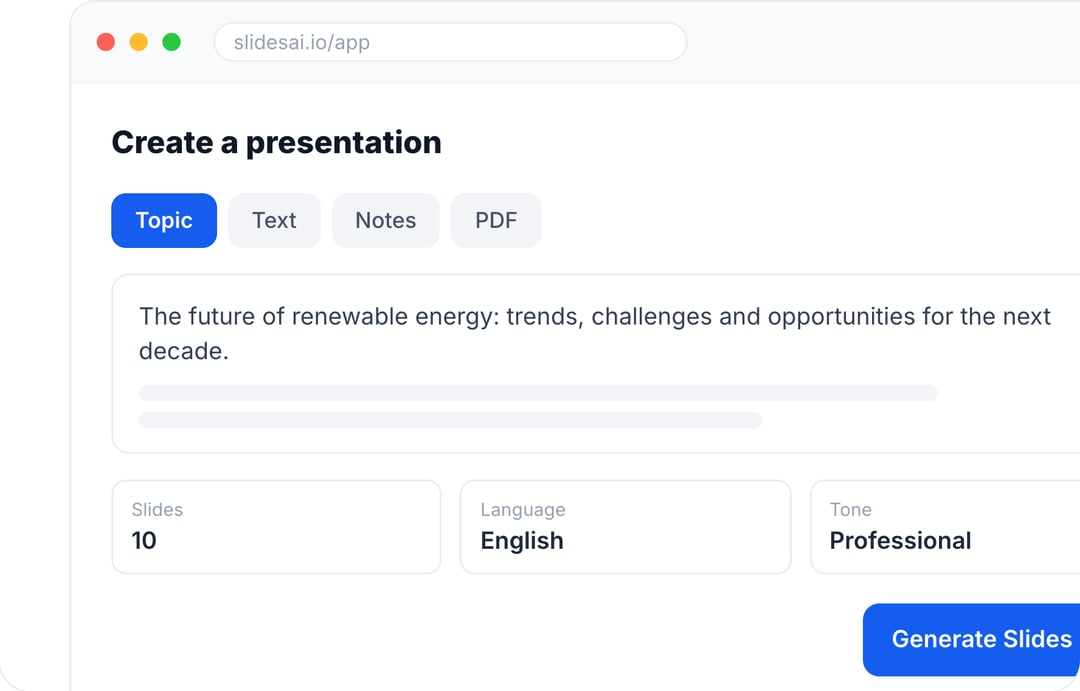
Create Presentations in Minutes With SlidesAI
- Start with a topic, text, notes, or PDF
- Generate slides in minutes
- Customize your presentation with ease
2. Claude Design – 4.2/5
Claude Design was one of the strongest tools for content accuracy. It understood the business brief well, although its visual output needed more refinement.
Claude included all the supplied data without missing information or hallucinating additional business figures. This was especially valuable because the benchmark contained a large number of individual business metrics.
Slide Design & Visuals – 3/5
Claude followed the requested clean design and brand colors, but the visual execution was inconsistent. Text sizes varied between slides, some text was difficult to read, and the charts and graphs had alignment issues. Some slides also contained considerable unused space. These issues are particularly relevant because the prompt explicitly requested “consistent spacing” and “minimal text throughout the presentation.”
Editing & Customization – 3/5
The exported presentation was editable, allowing users to modify text and layouts. However, charts and graphs were generated as images rather than editable chart objects. Changing their underlying data therefore requires regenerating the visualization.
Features & Export Options – 5/5
Claude supports PowerPoint, Google Slides, and PDF workflows. Its presentation capabilities are particularly useful when working from existing business material, as it can work with source documents and presentation structures rather than requiring users to start from a blank prompt. Claude also has a dedicated PowerPoint experience for creating, editing, understanding, and polishing presentations.
Platform Availability – 4/5
Claude is available through its web app and PowerPoint, with integrations that can connect it to existing presentation workflows. The PowerPoint experience is particularly useful because Claude can work inside the presentation environment instead of requiring users to create the deck separately and then move it into PowerPoint.
Ease of Use & Speed – 5/5
The conversational workflow was straightforward and required little onboarding. Generation took 2 minutes and 50 seconds, giving Claude a strong speed score.
Best for: Users who prioritize content accuracy and PowerPoint workflows.
3. Beautiful.ai – 4.2/5
Beautiful.ai produced accurate content and particularly strong editing capabilities. Its main weakness in our test was adherence to the specific branding requirements in the prompt.
Presentation : https://www.beautiful.ai/player/-OzfkW9oJ3QXnaEgVdOL/NexaFlow-Q2-Business-Review
Beautiful.ai covered the business information supplied in the benchmark without introducing unsupported figures. The content was organized into a logical presentation structure, making the deck usable as a first draft with relatively little content correction.
Slide Design & Visuals – 3/5
The overall layout looked polished and the charts were accurate. However, Beautiful.ai did not follow the specific brand colors requested in the prompt. The benchmark explicitly specified: “Primary Color: #2563EB (Blue), Secondary Color: #0F172A (Navy), Accent Color: #22C55E (Green), Background: #FFFFFF (White).” Because the tool’s visual styling did not consistently follow those requirements, we reduced the visual score despite the otherwise polished layouts.
Editing & Customization – 5/5
This was one of Beautiful.ai’s strongest areas. Text and layouts were easy to edit, charts could be modified within the editor, and images could be regenerated using AI.
Features & Export Options – 5/5
Beautiful.ai supports PowerPoint, PowerPoint images, Google Slides, PDF, print, and its Offline Player. It also combines AI-assisted content and image generation with automated layout capabilities.
Platform Availability – 2/5
Beautiful.ai is primarily a web-based presentation platform, with additional access through PowerPoint and ChatGPT. Its workflow is centered around the Beautiful.ai editor, while presentations can be moved into PowerPoint or Google Slides when users need to continue editing there.
Ease of Use & Speed – 5/5
The interface was straightforward and easy to navigate. Generation took only 1 minute and 50 seconds, making Beautiful.ai one of the fastest tools in the test.
Best for: Users who want polished layouts and strong editing and chart customization.
4. Gemini – 4.0/5
Gemini was one of the strongest performers for content accuracy and speed. Its biggest weakness was the relatively basic visual design and limited editing flexibility.
Content Quality – 5/5
Gemini accurately covered the content supplied in the prompt. It successfully incorporated the detailed business metrics provided in the benchmark, including financial, customer, marketing, and product data.
Slide Design & Visuals – 3/5
Gemini generated the graphs and charts requested in the prompt. However, the overall slide design was fairly basic and lacked the visual polish expected from a modern, executive-style presentation. The prompt specifically asked for a “clean, modern, executive-style design” with “consistent spacing, rounded cards, subtle icons, and minimal text throughout the presentation.” Gemini handled the requested visualizations but did not fully match that level of design refinement.
Editing & Customization – 2/5
The generated PPTX requires manual customization for detailed changes. Another limitation was that the generated graphs and charts were images rather than editable chart objects. Users therefore cannot simply change the underlying chart data directly.
Features & Export Options – 5/5
Gemini supports Google Slides, PowerPoint, and PDF workflows. Its Google Slides integration is particularly useful for users already working within Google’s presentation ecosystem. It can also work with reference files and existing presentation styles when generating slides.
Platform Availability – 4/5
Gemini is available through the Gemini interface and Google Slides, making it a natural option for users already working in Google’s productivity ecosystem. Gemini’s Google Slides integration allows users to generate and edit slides without leaving the presentation environment.
Ease of Use & Speed – 5/5
The familiar chatbot-style interface makes Gemini easy to use. Generation took 1 minute and 40 seconds, making Gemini one of the fastest tools tested.
Best for: Google ecosystem users who want fast, accurate presentation generation.
5. Gamma – 4.0/5
Gamma combines AI generation with a flexible card-based editor. Its editing experience was excellent, but its tendency to add unsupported business information lowered its content score.
Content Quality – 4/5
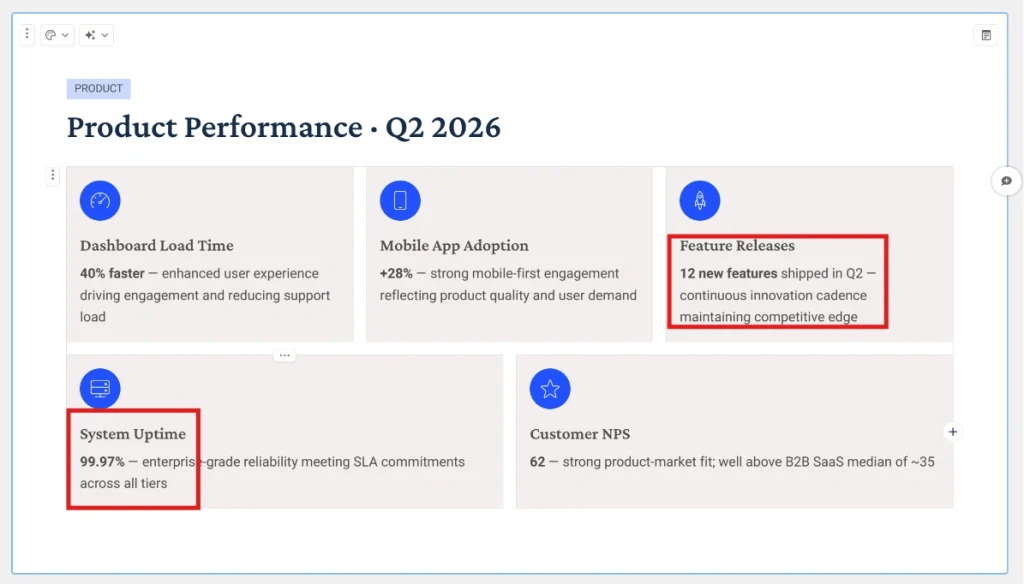
Gamma included the main information from the prompt but also introduced figures that were never provided. For example, the generated deck included “12 new features” and “99.97% uptime.” Neither figure was included in the supplied business data. The prompt specifically asked the tools to use the supplied business data, so these additions affected the content score.
Slide Design & Visuals – 4/5
Gamma followed the requested clean and minimal design and generally used the requested visual direction. However, some slides became congested, while other slides relied heavily on text instead of using additional visual elements. This was a slight mismatch with the prompt’s requirement for “subtle icons” and “minimal text throughout the presentation.”
Editing & Customization – 5/5
Gamma’s editor was one of its strongest features. The flexible editing environment made it easy to modify slide content, layouts, and visual elements, giving users significant control over the final presentation.
Features & Export Options – 4/5
Gamma supports PowerPoint, PDF, and PNG exports, while its card-based format gives users an alternative to traditional slide-by-slide presentations. It also supports web-based sharing and allows users to build presentations, documents, and other visual content from the same workspace. One limitation is that its non-standard card format can require some cleanup when exported to traditional PowerPoint slides.
Platform Availability – 3/5
Gamma is primarily available through its web app, with access to its presentation workflow through ChatGPT. Unlike tools built directly into Google Slides or PowerPoint, Gamma uses its own workspace and editor, which is part of what gives it its distinctive card-based presentation format.
Ease of Use & Speed – 4/5
The interface was easy to understand and the card-based editing experience made customization relatively straightforward. However, generation took 4 minutes and 50 seconds, which was slower than several of the tools in the test.
Best for: Users who want a flexible editor and a presentation experience beyond traditional slides.
6. Pitch – 4.0/5
Pitch produced accurate content and well-organized slides. Its biggest advantage was editing, particularly its editable charts and collaboration capabilities.
Presentation : https://pitch.com/v/q2-2026-business-review-hh4mzw
Content Quality – 5/5
Pitch covered the content included in the prompt without introducing unsupported business figures. The presentation structure also followed the requested business-review format.
Slide Design & Visuals – 4/5
Pitch organized information well and used negative space effectively. Its graphs and charts were also accurate. However, its template styling took priority over the exact brand colors specified in the prompt.
Editing & Customization – 5/5
Pitch performed particularly well in editing. Text and layout editing were straightforward, while graphs and charts remained editable. This is especially useful for business presentations because users can update the underlying numbers without rebuilding the visualization.
Features & Export Options – 4/5
Pitch supports PowerPoint and PDF exports, while its editor includes editable charts, tables, images, shapes, and other presentation elements. Its collaboration features are another major strength, making it useful for teams working together on client presentations or internal decks. PowerPoint exports preserve many presentation elements, although animations and some media features may not transfer completely.
Platform Availability – 2/5
Pitch is available through its web and desktop applications, with mobile apps also supporting presentation access and PDF export. Its platform is built around collaborative presentation creation, allowing teams to work together, share presentations, and provide feedback within the same environment.
Ease of Use & Speed – 4/5
The interface was straightforward and the workflow was easy to follow. Generation took 3 minutes and 30 seconds.
Best for: Sales and client presentations where editable charts and collaboration are important.
7. ChatGPT – 3.8/5
ChatGPT’s biggest advantage was speed. It generated a usable PowerPoint quickly and handled most of the supplied content accurately.
Content Quality – 4/5
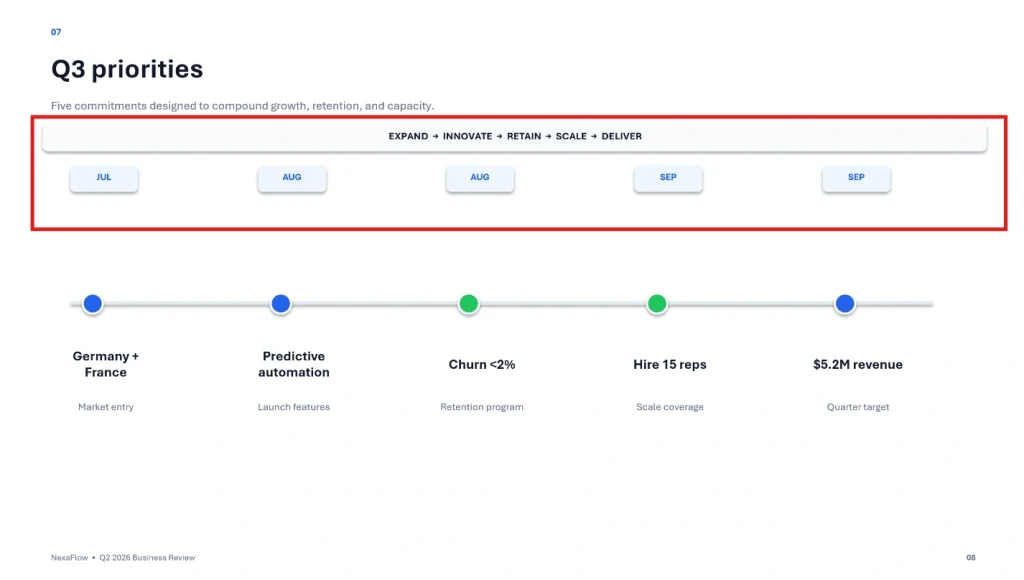
ChatGPT covered the supplied business information accurately, but it added months to the roadmap that were not included in the prompt. The benchmark requested “a roadmap timeline for Q3 priorities” but did not provide monthly milestones.
Slide Design & Visuals – 4/5
ChatGPT followed the requested colors and generated the requested bar chart and other visual elements. There were minor alignment issues in some text and slide elements, but the overall visual direction followed the benchmark reasonably well.
Editing & Customization – 3/5
The generated presentation is provided as a PPTX, so detailed changes can be made manually in PowerPoint. Follow-up prompting can also be used to request changes, but precise iterative modifications may require several attempts.
Features & Export Options – 5/5
ChatGPT can generate presentation files such as PPTX and can also create presentation-related outputs in other formats when requested. Its broader advantage is that presentations can be created from uploaded documents, spreadsheets, existing presentations, or detailed instructions rather than just a short topic. The PowerPoint experience can also create, edit, understand, and polish presentations while preserving editable slide structures.
Platform Availability – 2/5
ChatGPT is available through its web and desktop experiences, with presentation capabilities also available through integrations such as ChatGPT for PowerPoint. The PowerPoint experience places ChatGPT directly inside Microsoft’s presentation application, allowing users to create or modify slides without switching between separate tools.
Ease of Use & Speed – 5/5
The conversational interface makes the workflow familiar and straightforward. Generation took approximately 1 minute, making ChatGPT one of the fastest tools tested.
Best for: Users who want to generate a PowerPoint quickly through a conversational interface.
8. Prezi – 3.8/5
Prezi offers a different presentation experience from conventional slide makers. Its strong content accuracy and distinctive presentation style helped it stand out, although it did not consistently follow the supplied brand colors.
Presentation : https://prezi.com/craft/room/b416i3fwgan0
Content Quality – 5/5
Prezi included all the supplied data without missing information or hallucinating additional business figures. The resulting presentation also maintained a clear structure.
Slide Design & Visuals – 4/5
Prezi generated charts and followed the requested clean visual direction. However, the prompt explicitly required “Background: #FFFFFF (White)”, while several generated slides used dark backgrounds. Its animation and spatial presentation format also made the deck visually different from conventional presentations.
Editing & Customization – 4/5
Text and charts were easy to edit. Images could be replaced, but could not be regenerated with AI in the same way as some competing tools.
Features & Export Options – 3/5
Prezi supports PPTX and PDF exports, along with web-based sharing. Its main differentiator is the presentation format itself: instead of relying exclusively on conventional slide-by-slide layouts, Prezi uses movement, zooming, and spatial relationships to create a more dynamic storytelling experience. It also supports collaboration and brand controls for teams.
Platform Availability – 2/5
Prezi is primarily a web-based presentation platform. Presentations can be shared through web links or exported as PPTX and PDF, giving users flexibility between presenting online and using traditional presentation software.
Ease of Use & Speed – 5/5
Prezi was beginner-friendly and straightforward to use. Generation took 2 minutes and 5 seconds, giving it one of the better speed scores in the comparison.
Best for: Visual storytelling and presentations that need a more dynamic format.
9. Manus – 3.8/5
Manus was the strongest tool for visual design in this comparison. The presentation looked clean and followed the requested brand guidelines, although it made assumptions about the roadmap.
Content Quality – 4/5
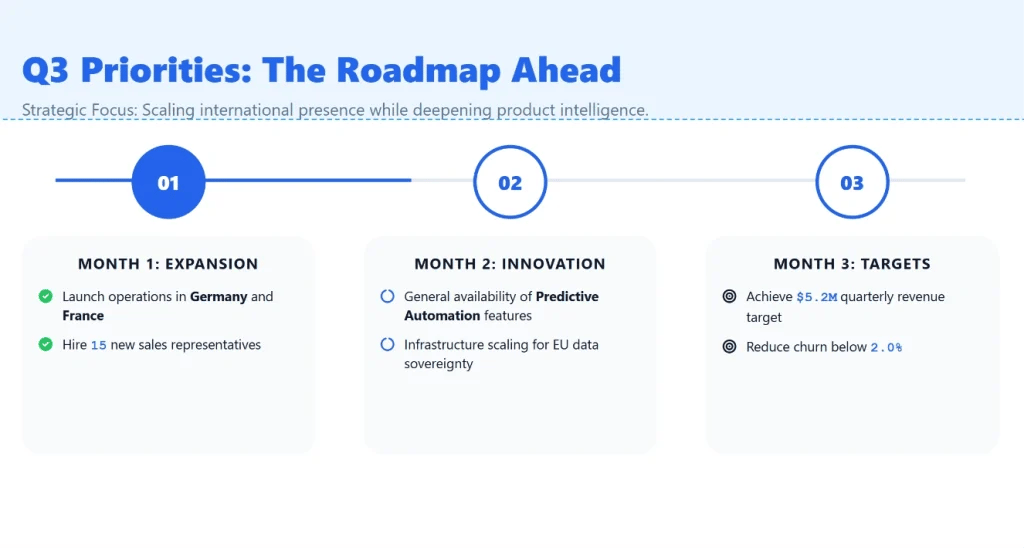
Manus included the supplied business information without hallucinating additional metrics. However, it interpreted the roadmap more specifically than the prompt required by organizing the priorities into monthly goals. The prompt did not provide monthly milestones, so this additional structure affected the content score.
Slide Design & Visuals – 5/5
This was Manus’s standout category. The deck maintained a clean, minimalist appearance, followed the requested brand guidelines, and used clear charts and graphs. This aligned closely with the prompt’s requirement for a “clean, modern, executive-style design” with “consistent spacing, rounded cards, subtle icons, and minimal text.”
Editing & Customization – 3/5
Manus provides a chat-based editor for modifying text and layouts. However, its charts and graphs were generated as images rather than editable chart objects.
Features & Export Options – 5/5
Manus supports PowerPoint, PDF, and interactive web presentations. One feature that separates it from many AI presentation generators is its ability to generate detailed speaker notes for every slide. It can also research topics, analyze uploaded spreadsheets and documents, generate charts and visuals, and refine the presentation through natural-language instructions.
Platform Availability – 2/5
Manus is primarily available through its web-based AI workspace, where presentation creation, research, editing, and presentation delivery happen in the same environment. Its generated decks can then be exported to PowerPoint or PDF, while interactive web slides can be presented directly from the browser.
Ease of Use & Speed – 4/5
The workflow was easy to understand, but generation was relatively slow. The presentation took approximately 4 minutes and 50 seconds to generate.
Best for: Business presentations where visual polish is a top priority.
10. AiPPT – 3.7/5
AiPPT handled the supplied business data accurately and offered strong export support, but the generated presentation needed additional refinement.
Presentation : https://agent.aippt.com/share/A9re0H129ypJydFHB_J_Ow
Content Quality – 3/5
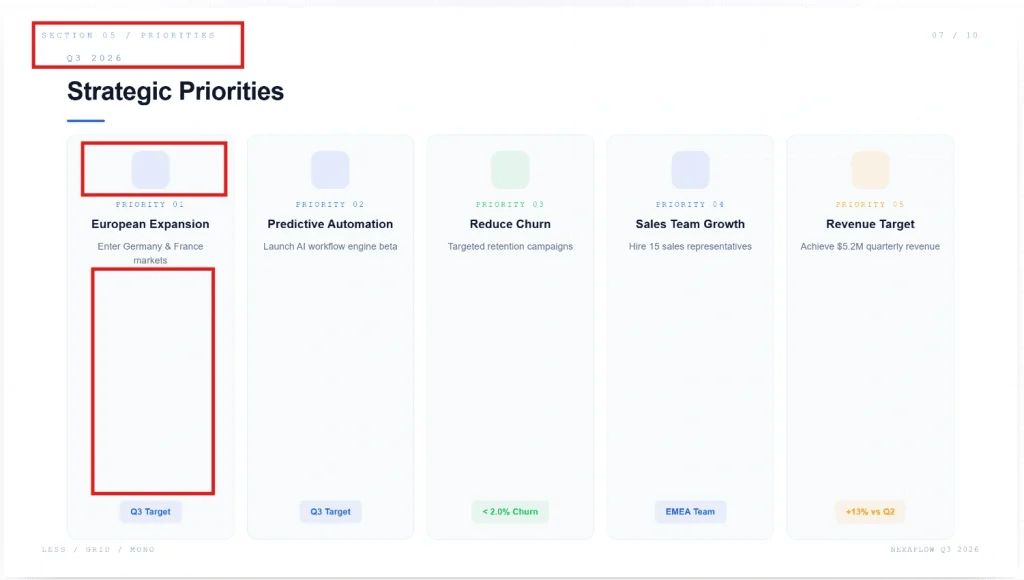
AiPPT included the supplied data without manufacturing additional figures. However, the actual text content was relatively thin, with the presentation relying heavily on charts and graphs. It also created placeholders for icons without actually filling them with icons. This was a noticeable weakness because the prompt explicitly requested “subtle icons” and asked for the presentation to be “visually engaging.”
Slide Design & Visuals – 3/5
The deck followed a clean and minimal direction, but it contained large areas of unused space and some readability issues. The prompt asked for a “clean, modern, executive-style design” that was “visually engaging, insight-driven, and presentation-ready with minimal manual editing.” The output therefore felt more incomplete in places than intentionally minimal.
Editing & Customization – 3/5
Text and layouts were relatively easy to edit. However, charts could not be modified directly on the canvas. Changing their underlying information required prompting the tool again.
Features & Export Options – 5/5
AiPPT supports Google Slides, PowerPoint, and PDF, giving users flexibility when moving generated presentations into other presentation workflows. It also supports AI-generated presentations from prompts and provides editing capabilities for text and layouts. Its broad export support makes it more useful for users who need to move the generated deck between presentation platforms.
Platform Availability – 3/5
AiPPT is available through its web app, where users can create and edit AI-generated presentations. The platform does not currently provide the same native Google Slides or PowerPoint application integration as some other tools in this comparison.
Ease of Use & Speed – 3/5
The interface was straightforward, but generation was considerably slower than most of the tools tested. The presentation took 11 minutes to generate, making AiPPT one of the slowest tools in the comparison.
Best for: Users who value export flexibility and don’t mind refining the initial output.
11. Presentation AI – 3.7/5
Presentation AI generated accurate content very quickly, but its chart selection showed why simply generating a visualization isn’t enough—the visualization also needs to communicate the requested data appropriately.
Presentation : https://app.presentations.ai/view/3kw7Pfn3u1
Content Quality – 5/5
Presentation AI included all the data supplied in the prompt without hallucinating additional information. This made it one of the strongest tools for faithfully reproducing the supplied business metrics.
Slide Design & Visuals – 3/5
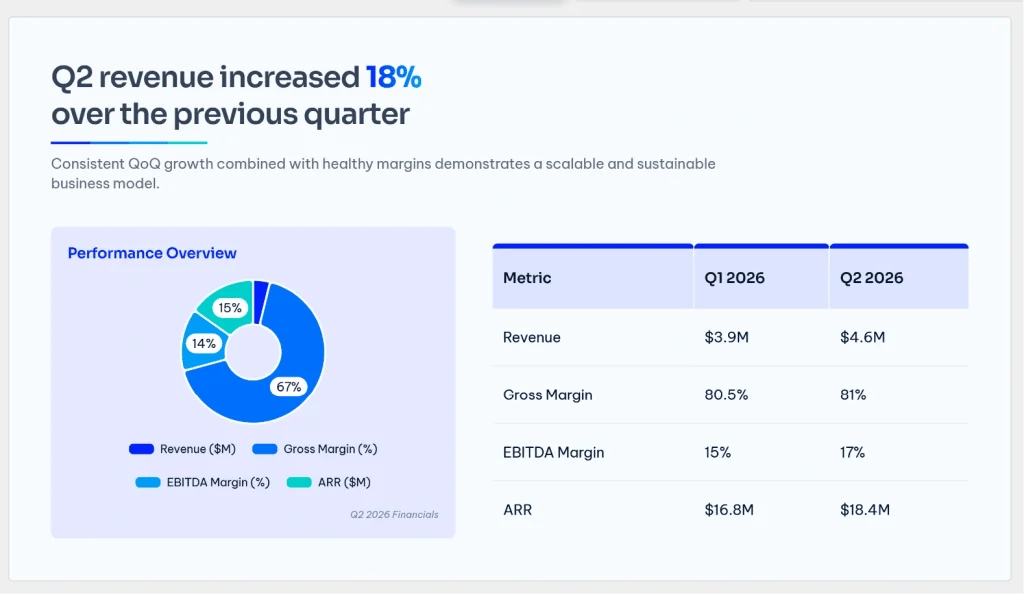
The presentation followed the requested clean design and used the specified brand colors. However, some charts were poorly suited to the information they represented. The prompt specifically requested a “bar chart comparing Q1 vs. Q2 revenue.” Presentation AI instead generated a pie chart for the comparison. The chart therefore did not follow the specific visualization instruction.
Editing & Customization – 4/5
General editing was straightforward, and images could be replaced using the available image library.
Features & Export Options – 3/5
Presentation AI supports PowerPoint, PDF, PNG, and HTML exports. The HTML option is useful when a presentation needs to be shared digitally rather than delivered only as a traditional slide file. However, some export options require a paid plan.
Platform Availability – 3/5
Presentation AI is available through its web app and ChatGPT. This gives users both a dedicated presentation-generation interface and a conversational way to create presentations without working exclusively inside a traditional slide editor.
Ease of Use & Speed – 5/5
The setup was straightforward and required little onboarding. Generation took only 1 minute and 10 seconds, making Presentation AI one of the fastest tools in the test.
Best for: Users who want a fast first draft and straightforward editing.
12. GenSpark – 3.7/5
GenSpark generated a visually consistent presentation and offered broad export support, but it introduced information that wasn’t in the original prompt.
Presentation : https://www.genspark.ai/agents?id=915cc33b-5b22-4d20-a8dc-6386df81ec86
Content Quality – 3/5
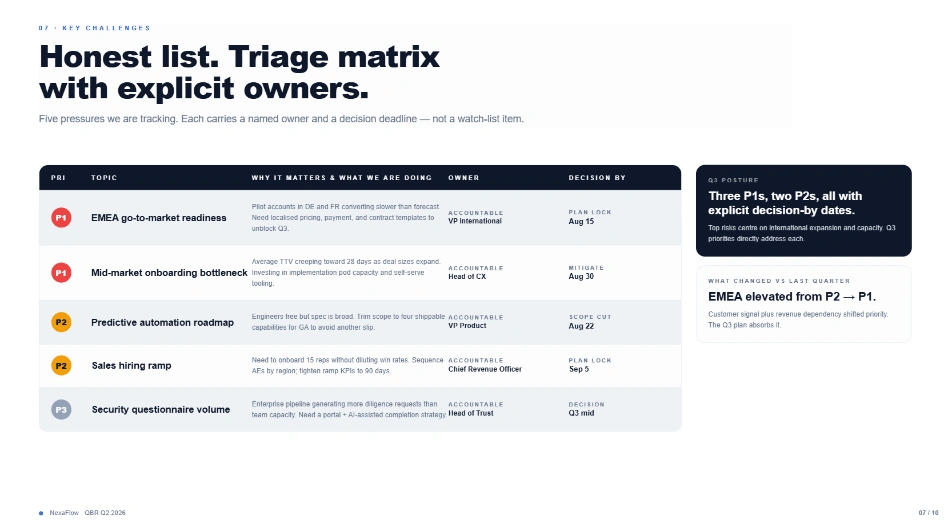
GenSpark included the supplied business data but also created additional information. For example, it assigned owners and decision dates to the Q3 priorities even though neither was supplied in the benchmark. The prompt asked for “a roadmap timeline for Q3 priorities” and listed the priorities, but did not provide owners or decision dates.
Slide Design & Visuals – 3/5
The deck generally followed the clean design direction and used the requested brand colors. However, the slides were highly information-dense, with some tables and layouts becoming crowded. There were also multiple alignment problems.
Editing & Customization – 3/5
Text and layout editing were relatively easy. The main limitation was that graphs and visuals were not directly editable. Users needed to prompt the tool again when they wanted to regenerate or change the visualizations.
Features & Export Options – 5/5
GenSpark supports Google Slides, PowerPoint, and PDF exports. Its AI Slides workspace goes beyond basic slide generation by combining presentation creation with research, document import, AI-generated visuals, speaker notes, fact verification, and batch editing. It can also import PDFs, Word documents, Excel files, and PowerPoint presentations as source material.
Platform Availability – 5/5
GenSpark is available through its web-based AI workspace, with generated presentations exportable to Google Slides and PowerPoint. Its AI Slides workspace keeps the conversation and presentation canvas together, allowing users to make changes directly to specific elements and queue multiple edits.
Ease of Use & Speed – 3/5
The chatbot-style workflow was easy to understand, but generation was comparatively slow. The presentation took 7 minutes and 30 seconds to generate.
Best for: Users who want broad presentation features and export support in an AI workspace.
13. PlusAI – 3.5/5
PlusAI performed well for content accuracy and speed, but its visualizations were one of its biggest weaknesses in this particular test.
Content Quality – 5/5
The presentation covered all the content included in the prompt. It successfully incorporated the supplied business metrics without the major content-generation issues seen in some other tools.
Slide Design & Visuals – 3/5
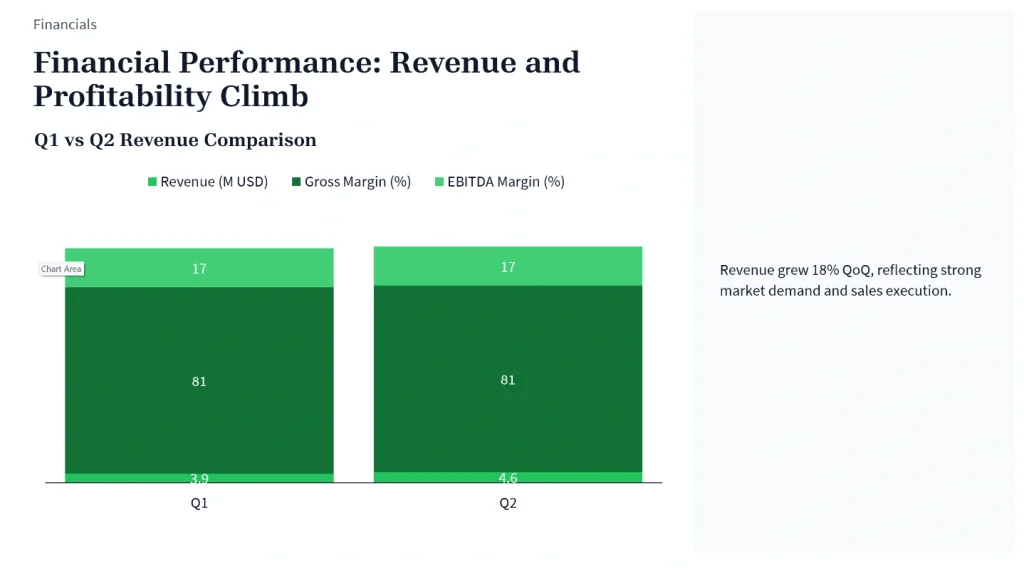
PlusAI did not follow the primary and secondary colors specified in the prompt. It also struggled with the requested data visualizations. The prompt specifically requested a “bar chart comparing Q1 vs. Q2 revenue.” Instead, the generated chart combined revenue with other metrics.
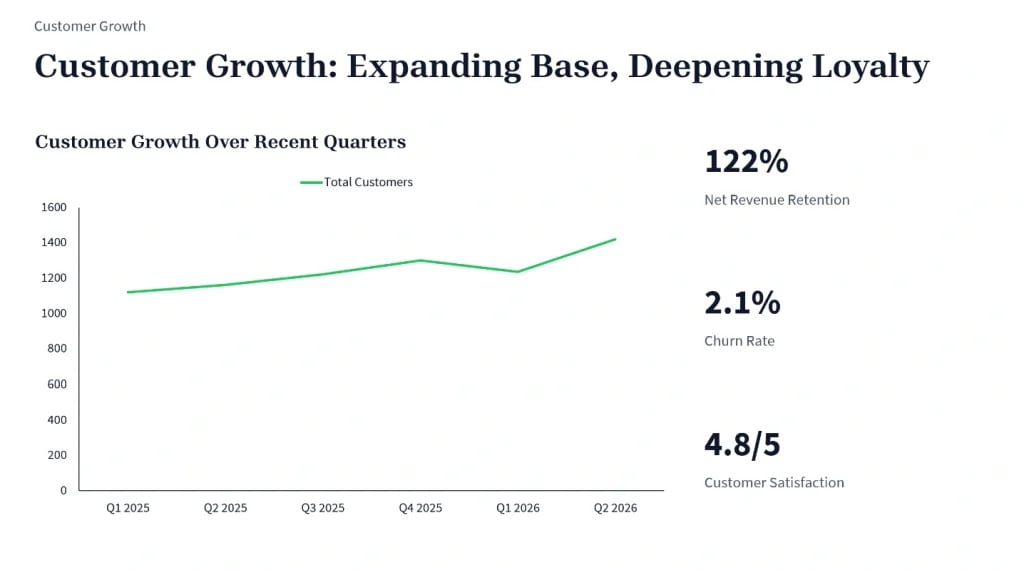
The customer-growth chart had a similar issue. The prompt requested a “line chart showing customer growth,” but the generated visualization introduced data points from 2025 that were not included in the supplied business data.
Editing & Customization – 3/5
The presentation was not editable directly in the web app during testing. However, the exported PowerPoint file was editable, allowing users to continue refining the deck after export.
Features & Export Options – 3/5
PlusAI provides PowerPoint export and focuses heavily on integrating AI into existing presentation workflows. It can generate presentations from text, PDFs, Word documents, PowerPoint files, and other source material, while features such as Rewrite, Remix, and Insert let users modify existing slides with AI. It can also generate charts, images, alternate layouts, and formatted versions of existing slides.
Platform Availability – 2/5
PlusAI works directly inside Google Slides and Microsoft PowerPoint, rather than requiring users to move their presentations into a separate design application. This is one of its strongest differentiators: users can generate, rewrite, remix, and edit slides while staying in the presentation tools they already use.
Ease of Use & Speed – 5/5
The workflow was easy to use, and generation took approximately 2 minutes and 13 seconds. That made PlusAI one of the faster tools in the comparison.
Best for: Users who prioritize accurate content and AI assistance within Google Slides and PowerPoint.
14. SlidesGO – 3.3/5
SlidesGO is more template-driven than AI-first, and that distinction became clear when it was asked to handle a data-heavy business presentation.
Content Quality – 4/5
The underlying content was generally accurate and did not hallucinate data. However, SlidesGO generated 11 slides instead of the requested 10. The prompt explicitly said “Create a 10-slide quarterly business review presentation,” so exceeding the requested slide count was a clear instruction-following issue.
Slide Design & Visuals – 3/5
SlidesGO’s template-first approach limits the flexibility of its AI generation. The prompt explicitly requested a bar chart comparing Q1 vs. Q2 revenue and a line chart showing customer growth. SlidesGO did not generate the requested graphs or visuals.
Editing & Customization – 3/5
Text and content editing were straightforward, but the template-driven approach provided less flexibility for changing the overall visual theme.
Features & Export Options – 4/5
SlidesGO supports PowerPoint and Google Slides exports and combines AI presentation generation with a large library of presentation templates. Its template-first approach makes it particularly useful for users who want to start with an established visual style rather than build a presentation design from scratch.
Platform Availability – 2/5
SlidesGO is primarily available through its web platform, where users can access its presentation templates and AI presentation generator. Presentations can then be exported to PowerPoint or Google Slides for further editing and sharing.
Ease of Use & Speed – 4/5
The workflow is simple: enter the prompt and select a theme. Generation took approximately 1 minute and 10 seconds, making SlidesGO one of the fastest tools in the test.
Best for: Users who prefer starting with templates and want a quick presentation draft.
15. Visme – 3.3/5
Visme produced one of the weaker AI-generated decks in this comparison, but its manual editor was among the strongest.
Presentation : https://my.visme.co/view/7v7gzdky-nexaflow-q2-2024-business-review#s1
Content Quality – 2/5
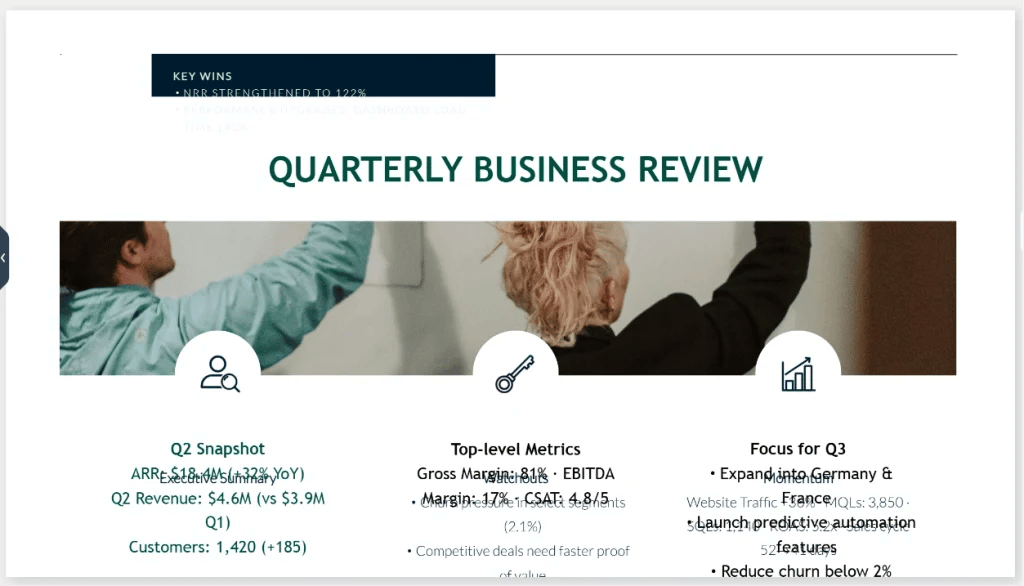
The generated content was difficult to read and poorly structured. Because the generation is template-based, Visme appeared to fit the supplied information into predefined placeholders rather than adapting the layout to the amount and type of information in the prompt. This was particularly problematic because the benchmark required a detailed quarterly business review while also asking for minimal text, clear data visualizations, a KPI dashboard, and a roadmap.
Slide Design & Visuals – 2/5
Visme did not follow the specified brand guidelines and relied heavily on its existing template styling. The result looked generic and made some of the supplied information difficult to read. This was a significant mismatch with the prompt’s requirement for a “clean, modern, executive-style design.”
Editing & Customization – 5/5
Visme performed much better once the presentation entered the manual editing stage. Text and layout editing were easy, and users could replace images using Visme’s image library. This makes Visme considerably more useful for users who are willing to refine the AI-generated first draft themselves.
Features & Export Options – 5/5
Visme has one of the broadest output ranges in this comparison. It supports PowerPoint, PDF, images, video, and interactive HTML5, as well as formats used for learning and digital content such as SCORM and xAPI. Beyond presentations, Visme includes tools for infographics, data visualization, interactive content, animation, and other visual assets.
Platform Availability – 2/5
Visme is primarily a web-based visual communication platform rather than a traditional desktop presentation application. Its browser-based workspace gives users access to presentation creation alongside infographics, data visualization, video, interactive content, and other visual formats.
Ease of Use & Speed – 4/5
The editor was easy to use, and generation took 2 minutes and 40 seconds.
Best for: Users who care more about manual customization than first-draft AI generation.
Best AI Presentation Makers by Use Case
| Best For | Tool | Why |
|---|---|---|
| Google Slides & PowerPoint Workflows | SlidesAI | Works across Google Slides and PowerPoint and fits into existing presentation workflows. |
| Traditional PowerPoint Presentations | Claude Design | Strong PowerPoint workflow with accurate content and editable exports. |
| Non-Traditional Presentations | Gamma | Uses a flexible card-based format and offers a presentation experience beyond traditional slide decks. |
| Simple, Professional Designs | Beautiful.ai | Focuses on polished layouts and automated design, making it easier to create clean presentations. |
| Visual Storytelling | Prezi | Uses animation and a distinctive presentation format rather than conventional slide-by-slide storytelling. |
| Sales & Client Presentations | Pitch | Strong editing and collaboration capabilities make it useful for teams creating customer-facing decks. |
| Startup & Investor Pitch Decks | Manus | Produced a visually strong business presentation in testing, with clear charts and a clean structure. |
| AI Presentations from a Chatbot | ChatGPT | Creates presentations through a conversational workflow and generated the tested deck quickly. |
| Template-Based Presentations | SlidesGO | Template-first workflow makes it useful for users who prefer starting from an existing design. |
| Highly Customizable Presentations | Visme | Strong manual editing and customization capabilities, particularly for text, layouts, and visuals. |
What Do You Get for Free? Pricing Comparison
| Tool | Free Plan | What You Get for Free | Paid Plans Start At |
|---|---|---|---|
| SlidesAI | Yes | 1 presentation/month | $10/month |
| Gamma | Yes | 400 credits; up to 10 slides per prompt | $9/month |
| Prezi | Yes | 500 AI credits; up to 5 projects; no monthly renewal | $7/month |
| Presentation AI | Yes | 100 AI credits; up to 10 projects; no monthly renewal | $20/month |
| AiPPT | Yes | 1 presentation/month | $10/month |
| SlidesGO | Yes | 3 AI-generated presentations/month; limited templates | $7.99/month |
| ChatGPT | Yes | Free access with a daily conversation cap | $8/month |
| Gemini | Yes | Free access with a daily conversation cap | $19.99/month* |
| GenSpark | Yes | 100 credits/day | $25/month |
| Manus | Yes | Free plan available | $20/month |
| Pitch | Yes | 100 AI credits; no monthly renewal | $13/month |
| Visme | Yes | 10 AI credits/month; one generation uses 3 credits | $12.25/month |
| Claude Design | No | — | $20/month |
| PlusAI | No | Free trial requires a credit card | $15/month |
| Beautiful.ai | No | Free trial requires a credit card | $14.50/month |
Pricing note: The prices listed above are as of August 2026 and are subject to change. Free-plan limits, credits, paid pricing, and available features can change over time, so check each tool’s official website for the latest information.
Why Choose SlidesAI Over Other Presentation Makers?
SlidesAI’s biggest advantage isn’t that it wins every individual category. Its strength is the combination of accurate content, broad workflow compatibility, and multiple ways to create presentations.
- Works Within Existing Workflows: SlidesAI is available across Google Slides, PowerPoint, its web app, and ChatGPT, allowing users to add AI presentation generation to familiar workflows.
- Supports Multiple Types of Input: You can start with rough notes, topics, full scripts, or documents, making it useful when your presentation content already exists in another format.
- Creates Presentations Tailored to Your Audience: Users can provide details such as presentation type, target audience, tone of voice, language, and whether the deck will be presented live or shared for self-reading.
- Lets You Edit the Outline Before Generating Slides: SlidesAI lets users review and refine the presentation outline before generating the final slides, giving them more control over the structure and content.
Conclusion
Testing 15 AI presentation makers showed that performance varies across content accuracy, visuals, editing, and workflow compatibility.
- SlidesAI – 4.5/5: Accurate content, solid visuals, multiple export options, and broad workflow support.
- Claude Design – 4.2/5: Strong content accuracy and presentation generation.
- Beautiful.ai – 4.2/5: Strong editing and chart customization.
- Gemini – 4.0/5: Good content accuracy and fast generation.
- Gamma – 4.0/5: Flexible editing and customization.
- Pitch – 4.0/5: Strong editable charts and collaboration features.
The test also showed that AI tools can introduce unsupported data, incorrect chart types, or changes to the original prompt.
Ultimately, the best tool depends on your priorities. SlidesAI is a strong choice for users who want accurate content and the flexibility to work across Google Slides, PowerPoint, its web app, and ChatGPT.