

Every business proposal carries more than just facts and numbers. Behind the slides is someone with an idea they truly believe in, hoping others will believe in it too. Whether you’re trying to land your first client, pitch a bold new project, or secure funding for something that matters to you, your presentation becomes a bridge between your vision and their understanding. This blog is here to help you build that bridge. Instead of just focusing on slide design or bullet points, we’ll guide you through crafting a proposal that feels clear, confident, and true to your goals. Let’s jump right into it.
What is a Business Proposal Presentation?
A business proposal presentation is a visual pitch that introduces your product, service, or plan to a potential client, investor, or partner. It is designed to persuade the audience to take action, like agreeing to a deal or approving funding. This type of presentation explains the problem, offers a tailored solution, breaks down the costs, and highlights the value your idea brings. Instead of handing over a long written proposal, you walk the audience through your ideas using slides that tell a clear and structured story. Along the way, you use data, visuals, and examples to build credibility and guide your audience toward a decision.
What is the Purpose of a Business Proposal Presentation?
A business proposal presentation is built to create a strong impact and move your audience toward a decision. Here’s what it helps you do:
1. Problem and Solution Focus
You start by identifying the exact problem your audience is facing. Then, you show how your product or service solves it in a way that stands out. Instead of listing technical features, the focus stays on how your solution brings real benefits to the table.
2. Persuasion and Action
The core aim is to persuade. Your presentation should guide the audience toward a clear next step. This could be agreeing to a partnership, approving funding, or making a purchase. Every slide and point you make should support this goal.
3. Information and Education
A good proposal also educates. It introduces your business, explains how your offering works, and highlights what makes you different. This helps the audience make an informed decision. Using AI tools such as RFP AI can further enhance this process by helping businesses generate clear, structured, and informative proposals that better communicate their value to potential clients.
4. Building Trust
Trust is earned through transparency and credibility. Use the presentation to highlight your team’s experience, your track record, and your commitment to quality. Testimonials, case studies, and certifications also help build confidence.
5. Strategic Alignment
Show that your proposal fits into your audience’s bigger goals. This creates a sense of shared vision. You want them to see that working with you leads to long-term success for both sides.
6. Foundation for Agreement
Your presentation can also set the stage for formal agreements. By clearly outlining timelines, deliverables, pricing, and terms, you reduce misunderstandings and make future collaboration smoother.
How to Create a Business Proposal Presentation?
Here’s how to create a business proposal presentation:
1. Clarify Your Goal
Before you even open PowerPoint or any presentation tool, take a moment to clearly define what you want this proposal to achieve. Think about your audience and the result you are aiming for. The goal of the presentation will determine your tone, the content you prioritise, and the way you deliver it.
Ask yourself questions like:
- Am I pitching a new product or service to a potential client?
- Is this presentation meant to convince internal leadership to approve a project?
- Am I trying to secure funding from investors?
The clearer your objective, the more focused and relevant your presentation will be. For example, an investor pitch may need to highlight market potential and financial projections, whereas a client pitch should focus on outcomes, deliverables, and timelines.
2. Plan the Storyline
A clear storyline keeps your audience engaged. Build your presentation like a story with these steps:
- Hook or opening: Start with something that grabs attention. This could be a surprising fact, a bold statement, or a relatable scenario.
- Problem: Describe the issue or challenge that your audience is dealing with. Make sure they see that you understand their needs.
- Solution: Introduce your product, service, or proposal as the solution to the problem. Explain how it works in simple, clear terms.
- Closing: Finish with a compelling call to action that encourages your audience to take the next step.
3. Create an Effective Slide Layout
Organising your slides into logical sections helps your audience follow your message without getting lost. Here’s a commonly used structure:
- Title Slide: Include the title of your proposal, your name, company logo, and date.
- Introduction: A brief overview of what you are about to present.
- Problem Statement: Explain the issue that your proposal addresses.
- Your Solution: Describe your product, service, or idea and how it solves the problem.
- Benefits and Value: Highlight what makes your solution valuable or unique.
- Timeline or Implementation Plan: Show how and when you will deliver.
- Budget or Pricing: Provide clear and transparent cost details.
- Objections and Responses: Address any concerns your audience might have.
- Conclusion and Call to Action: Summarise your pitch and tell them what to do next.
This structure keeps your message focused and builds trust as the audience sees that you have covered all important areas.
4. Focus on Problem and Solution
This is the heart of your proposal. As mentioned earlier, clearly describe the problem your audience is facing using simple language and relatable examples. Use data or evidence to back it up if possible.
Then, explain your solution. Go beyond just stating what your product or service is; highlight how it solves the problem. Focus more on the benefits rather than just listing features.
Features tell, but benefits sell.
Use bullet points, visual comparisons, or real-life scenarios to make this part easy to follow and convincing.
5. Use a Professional Template
Visual presentation matters. Instead of creating each slide manually, start with a professionally designed template that reflects your brand identity. This ensures your presentation feels consistent and polished from start to finish.
Tips for design consistency:
- Use your brand’s official colours, fonts, and logos
- Align content properly and maintain uniform spacing
- Avoid cluttered slides with too much text
A clean and professional layout helps build credibility and keeps the audience focused on your message rather than the design.
“Want a faster way to build your proposal? Start with our Business Proposal Template and customize it for your audience.”
6. Add Engaging Visuals
Visuals help break up long blocks of text and make your ideas easier to understand. Instead of listing information in paragraphs, consider using:
- Charts and graphs: Great for explaining data, trends, or comparisons
- Icons: Use them to represent ideas or simplify slide layouts
- Images: Choose visuals that reinforce your message or evoke an emotional connection
Avoid overloading visuals. Use them to enhance understanding, not distract. A well-chosen image or chart can sometimes communicate more than a full paragraph.
7. Anticipate Objections
Your audience might have questions or concerns. Rather than waiting for them to bring these up, include a slide that directly addresses the most likely objections.
Common concerns might be:
- Is this affordable or within budget?
- Can this be delivered on time?
- How do you handle potential risks or issues?
Show that you’ve already thought about these challenges and have answers. This builds confidence in your proposal and shows your preparedness.
8. Use Multimedia Elements (When Relevant)
To make your proposal more memorable, you can go beyond static slides and use multimedia. For example:
- Short demo videos to showcase a product or service
- Audio clips such as a voiceover or customer testimonial
- Simple animations to reveal information step by step
- Interactive elements like clickable links or embedded tools
Use these only when they serve a purpose. They should enhance clarity and engagement without making the presentation feel distracting or overly complex.
9. Test Readability and Accessibility
Before you present, go through each slide and test how it looks on different screen sizes. Ask yourself:
- Can the text be read from the back of a room or on a smaller laptop?
- Are the colours high-contrast enough for visibility?
- Are the fonts large enough and easy to read?
If possible, check for accessibility by using tools or settings that simulate how your slides look for people with visual impairments. Making your presentation accessible shows consideration for all members of your audience.
10. End With a Strong Closing
Your final slide is your last impression, so make it count. Use it to:
- Recap the most important benefits of your proposal
- Reaffirm why your solution is a strong fit
- Present a clear next step, such as scheduling a meeting, signing a contract, or sharing feedback
Make the call to action specific and actionable. Instead of a vague “Thank You,” try something like: “Let’s connect to finalise the onboarding plan,” or “Contact us to get started today.”
Common Mistakes to Avoid in Business Proposal Presentations
Even the best proposals can fall short if common mistakes go unchecked. Here’s what to avoid:
- Using the same content for everyone. If your slides feel generic, your audience will tune out. Tailor each proposal to the client’s specific goals and problems.
- Putting too much on one slide. Long paragraphs, complex charts, or too many ideas at once can overwhelm your audience. Stick to one message per slide.
- Focusing too much on yourself. Don’t make it all about your company. Show the client what’s in it for them. Highlight benefits, not just features.
- Leaving out a clear call to action. If you don’t say what you want your audience to do next, they probably won’t do it. Ending with a powerful CTA is super important.
- Not addressing the competition. If you don’t explain how you stand out, the client may assume you’re just like everyone else.
- Poor visual design. Cluttered slides, mismatched fonts, or outdated templates hurt credibility. Keep your design clean, clear, and consistent.
- Reading directly from the slides. This makes your delivery flat and forgettable. Use the slides to support what you say, not replace it.
- Not practicing. Without a dry run, you risk running out of time, stumbling on words, or facing technical issues unprepared.
- Using too much jargon. Technical terms can confuse or distance your audience. Use simple language unless you’re sure they’ll understand.
- Weak body language. Avoid slouching, reading from notes the whole time, or not making eye contact. Confident delivery matters just as much as good content.
- No follow-up. Even the best presentation needs a next step. If you don’t reach out afterward, you lose momentum and risk losing the opportunity.
- Careless errors. Typos, wrong numbers, or missing details make you look unprofessional. Always double-check your slides before presenting.
- A messy structure. A presentation that jumps around or lacks flow is hard to follow. Use a clear, logical order from start to finish.
How SlidesAI Helps Create a Business Proposal Presentation?
If you’re short on time or not confident with design, SlidesAI can help you turn your ideas into a professional-looking business proposal in minutes. Here’s how to do it:
Step 1: Start by creating an outline. Write down the main points or slide-wise structure of your business proposal.
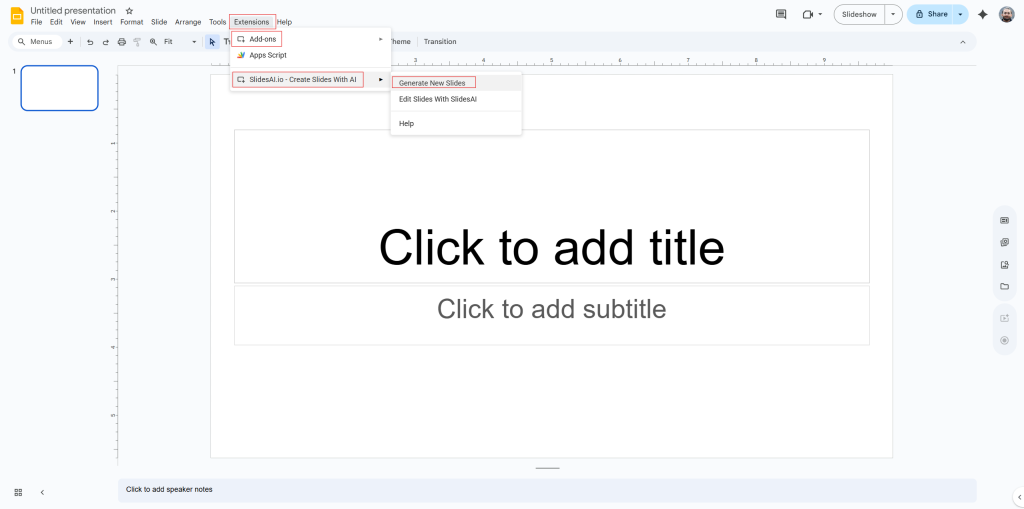
Step 2: Open your Google Slides. Then go to Add-ons > SlidesAI.io > Generate new Slides.
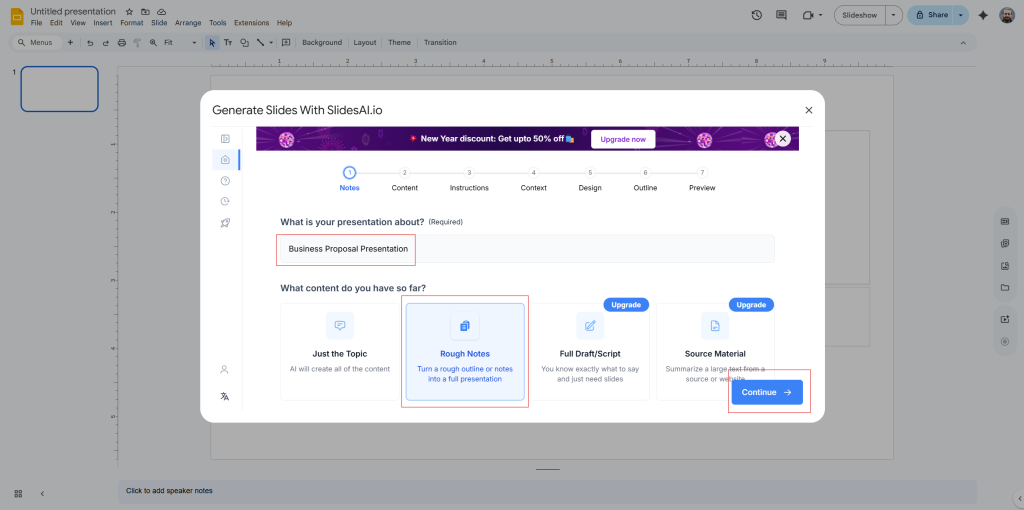
Step 3: When prompted, enter your topic. In this case, type “Business Proposal Presentation” and choose the “Rough Notes” option.
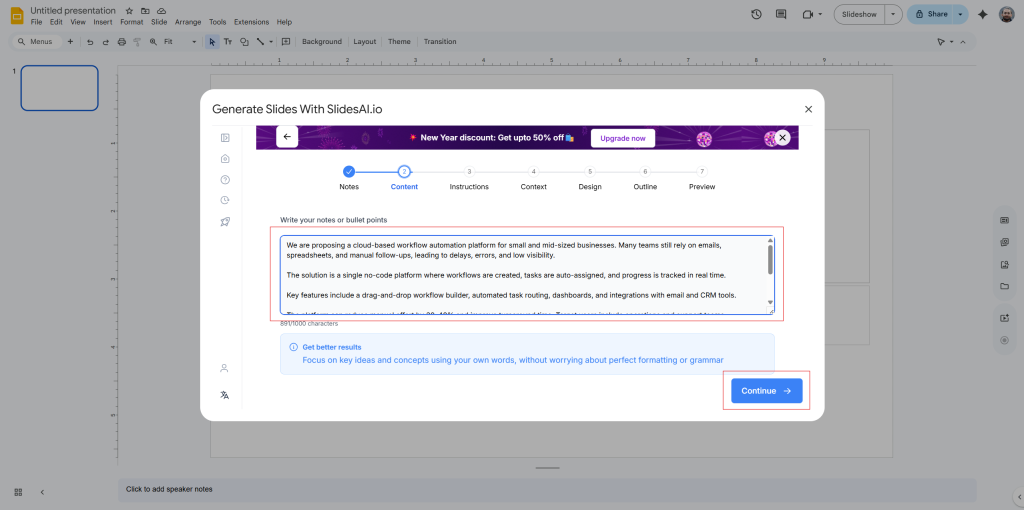
Step 4: Paste your outline into the space provided, separating points based on slides.
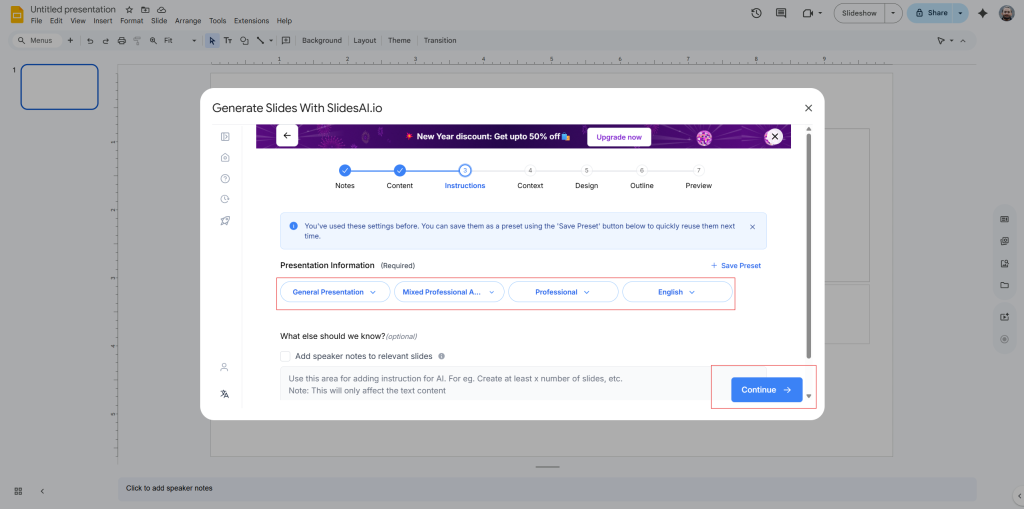
Step 5: Now select your settings. Choose:
- Presentation type: General presentation
- Audience: Mixed professionals
- Tone: Professional
- Language: Select your preferred language (e.g., English)
Step 6: Review the auto-generated outline. Then pick a suitable template that fits the tone and purpose of your proposal.
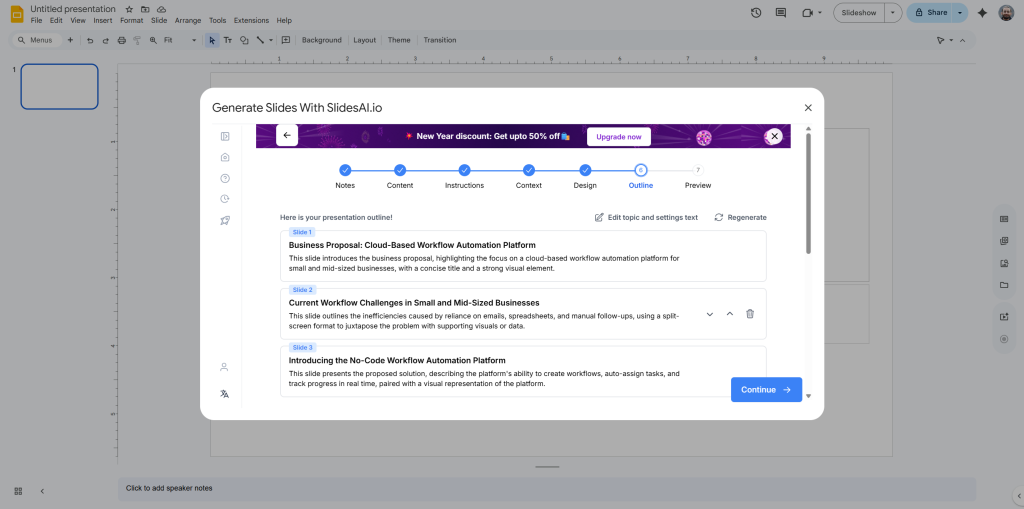
Step 7: Done! Your presentation will be ready within seconds. You can now fine-tune it or present as is.
Create AI presentations directly in Google Slides.
- No design skills required
- 3 presentations/month free
- Save directly in Google Slides

Closing Thoughts
Creating a business proposal presentation is about telling your story in a way that feels clear, honest, and convincing. When you understand your audience, focus on real problems, and guide them toward a simple next step, your proposal becomes much more than a pitch. Use the steps shared in this guide to build presentations that people actually remember and act on. With the right structure and tools, you can turn your ideas into proposals that open real opportunities.
Frequently Asked Questions (FAQs)
1. What is a business proposal presentation?
It’s a visual pitch that explains your product, service, or idea to a client, investor, or partner. It outlines the problem, your solution, expected outcomes, and why your approach is valuable.
2. How long should a business proposal presentation be?
Aim for 10 to 15 minutes, or about 8 to 12 slides. Keep it clear, focused, and engaging throughout.
3. What should be included in a business proposal presentation?
Include an introduction, problem, solution, timeline, pricing, team, proof of success, and a strong call to action.
4. How is a business proposal presentation different from a written proposal?
A presentation is shorter and more visual. You talk through slides to persuade in person, while a written proposal is detailed and often shared as a document.
5. Can AI tools help create a business proposal presentation?
Yes, AI tools can speed up slide creation, generate content, suggest designs, and structure your pitch clearly, saving you time and effort.