

Turning a detailed case study into a compelling presentation is often more challenging than writing the case study itself. Many professionals struggle to decide what information to include, how to structure slides, and how to present results clearly. Learning how to create a case study presentation helps you communicate real-world outcomes in a way that is easy to understand and convincing for your audience.
What Is a Case Study Presentation?
A case study presentation is a structured way of showcasing a real-world problem, the approach taken to solve it, and the results achieved. Unlike long reports, it focuses on storytelling, visuals, and key insights that help the audience quickly grasp the value of the solution.
Key Components of a Strong Case Study Presentation: What Should You Include?
An effective case study presentation format follows a logical flow that guides the audience from context to outcomes. Here’s what you should include:
- Background & Context: This section introduces the company, client, or scenario so the audience understands who the case study is about and why it matters.
- Defined Problem or Challenge: A clear explanation of the problem sets the stage and helps the audience relate to the situation.
- Approach & Method Used: This part explains the strategy, tools, or process used to address the problem in a simplified manner.
- Solution & Execution: Here, you describe the actions taken and how the plan was implemented step by step.
- Results & Measurable Outcomes: Results should focus on data, metrics, or tangible improvements that show the impact of the solution.
- Key Learnings & Insights: This section highlights lessons learned and insights that can be applied to similar situations.
- Questions & Discussion: Allowing space for questions helps clarify details and encourages engagement.
How to Create a Case Study Presentation: Step-by-Step Guide
The following steps will help you move from raw case study content to a structured, engaging presentation that highlights results and insights effectively:
1. Choose a Presentation Design
Start by identifying your audience. Analyze who will view the presentation and what you want them to take away from it.
A sales-focused case study may need bold visuals and outcome-driven slides, while an academic presentation may require a cleaner layout with more emphasis on methodology and data clarity. Choose a design that clicks better with your audience.
2. Stick to One Presentation Structure
Outline the slide sequence before designing individual slides to maintain a logical narrative. A clear flow from context and problem to solution and results helps the audience follow the story without confusion.
3. Enhance the Readability
Long paragraphs are more likely to affect the overall reading experience. Instead, rewrite them into concise bullet points so the audience can quickly understand key information without having to read dense text. To further enhance the readability, make sure that each slide focuses on one idea.
4. Present in a Problem-Solution Narrative
Clearly define the challenge faced and explain why it mattered before presenting the solution. This contrast helps the audience understand the value of the approach and makes the results more meaningful.
5. Maintain Visual Clarity & Consistency in Slides
Use consistent fonts, colors, and spacing across all slides to create a professional look. Visual consistency reduces distraction and keeps the focus on the message rather than the design.
6. Visualize Wisely
Charts, graphs, and simple visuals help communicate results more clearly than text alone. Choose visuals that highlight trends and outcomes rather than overwhelming the slide with raw numbers.
7. Highlight Results & Insights
Have a separate slide for the results and insights in your case study presentation for better impact. This reinforces credibility and helps the audience remember the value delivered by the solution.
8. Review the Presentation
Review and refine the presentation from start to finish to ensure everything flows smoothly. Remove repetitive information and adjust wording so each slide supports the central message.
9. Add Conclusion with a CTA
End the presentation with a clear summary and a specific next step, such as a recommendation, discussion point, or decision request. A strong close ensures the presentation feels complete and purposeful.
Case Study Presentation Template by SlidesAI
Use our case study presentation template to clearly present the challenges, approach, and outcomes of a real-world scenario! Designed for a wide range of professional and academic use cases, our ready-made slide decks help you communicate your case study in a structured and engaging way.
Our templates include flexible layouts and design options that work well for business reviews, classroom presentations, client discussions, and case study interviews.
Explore our case study presentation templates to create clear, professional slides faster and with less manual effort.
Create Presentations in Minutes With SlidesAI
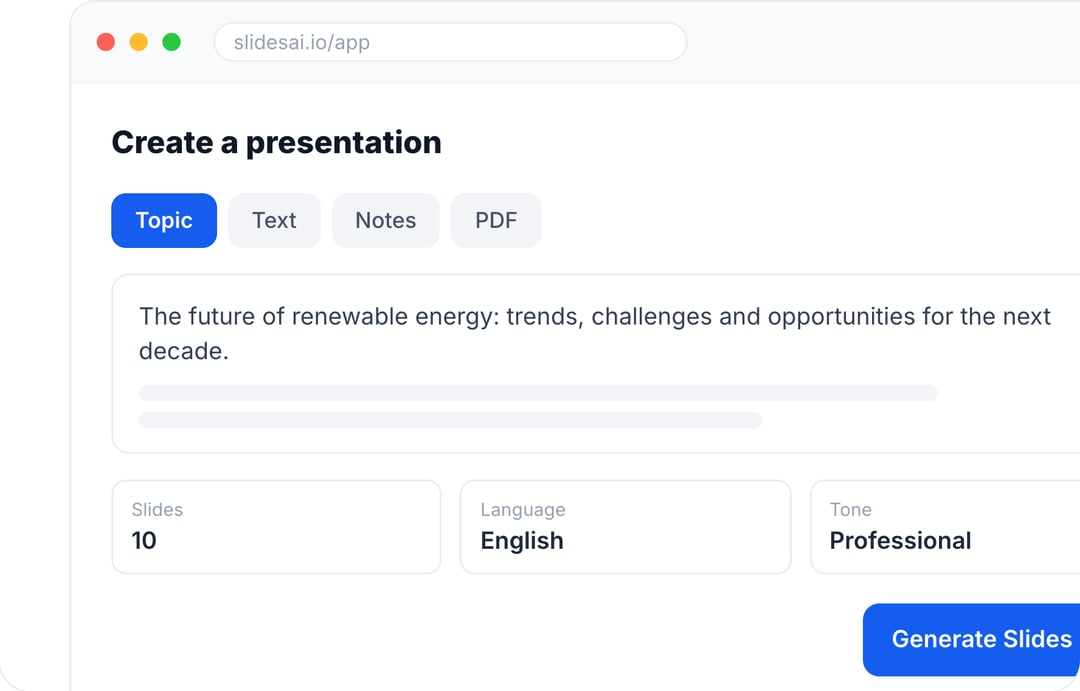
- Start with a topic, text, notes, or PDF
- Generate slides in minutes
- Customize your presentation with ease
5 Tips for Creating Effective Case Study Presentations
Following proven best practices helps ensure your case study presentation is easy to follow, credible, and persuasive for any audience.
- Give Context: Begin by explaining who the case study is about and what the presentation aims to demonstrate. This gives the audience the context they need to understand why the case study matters.
- Follow a Logical Content Structure: Present the challenge first, then explain the solution, and finally show measurable outcomes. This structure keeps the narrative clear and prevents confusion.
- Add Data & Evidence: Use metrics, visuals, or concrete examples in the case study presentation to back up your statements. Evidence builds trust and makes your presentation more convincing.
- Keep Visuals Simple: Limit each slide to one main idea and use consistent design elements. This improves readability and helps the audience stay focused.
- End with a Strong Conclusion: Summarize the main insights and explain what action or decision should follow. A strong ending ensures your message is remembered.
5 Common Mistakes to Avoid for Better Case Study Presentations
Avoiding the following mistakes helps ensure your case study presentation communicates value clearly and keeps the audience engaged from start to finish.
- Not Setting Context: When the problem is not clearly explained, the solution loses its impact. Always establish background and challenges so the audience understands why the solution matters.
- Overcrowding Slides: Slides packed with paragraphs or excessive data are difficult to follow. Keep content concise and explain details verbally or through visuals.
- Highlighting Tasks & Not Outcomes: Describing what was done is less effective than showing what was achieved. Focus on measurable results to demonstrate real impact.
- Using Weak Visuals: Charts and graphics that lack clarity can distract or mislead the audience. Choose visuals that clearly support the data being presented.
- Not Adding Takeaways or CTAs: A presentation without a conclusion feels incomplete. Summarize insights and clearly state what action or decision should follow.
How Can SlidesAI Help You Turn Your Case Studies into Clear Presentations?
If creating a structured and proper case study presentation is a time-consuming task you cannot keep up with, SlidesAI can simplify this process for you by helping you convert structured content into presentation-ready slides inside the tools you already use.
Here is how SlidesAI supports the entire case study presentation workflow:
- Converts written case studies into slide-ready content: SlidesAI helps turn long-form case study text into structured slides with clear headings and concise bullet points, making the content easier to present and understand.
- Works directly inside Google Slides & PowerPoint: You can create and edit your case study presentation without switching platforms, which saves time and avoids formatting issues.
- Applies clean, consistent slide layouts automatically: SlidesAI handles spacing, alignment, and layout consistency, making your presentation more polished without requiring design expertise.
- Reduces manual effort & repetitive formatting work: By automating slide structure and layout, SlidesAI allows you to focus more on storytelling and insights rather than slide design.
SlidesAI is especially useful for marketers, consultants, educators, and teams who need to present real-world results clearly and professionally, without spending hours building slides from scratch.
Create Presentations Easily in Google Slides and PowerPoint
14M+Installs
 Install add-in
FAQs About Case Study Presentations
1. How long should a case study presentation be?
Ideally, 10 to 15 slides are enough for a case study presentation. But this depends on the depth of your topic and the audience you’re catering to.
2. What is the ideal structure of a case study presentation?
A case study presentation should include necessary elements like context, problem, approach, solution, results, and takeaways.
3. What is the difference between a case study presentation and a case study report?
A case study presentation is visual and concise. On the other hand, a report is detailed and text-heavy.
4. What visuals work best in a case study presentation?
Adding visuals in your case study presentation is a great way to make it more effective and visually interesting. Charts, graphs, timelines, and simple diagrams work best.
5. How do you simplify complex information in a case study presentation?
Complex information needs to be simplified in a case study presentation for a better breakdown of details and understanding. You can use visuals, bullet points, and clear language.
6. Are case study presentation templates effective?
Yes, using ready-made presentation templates helps maintain structure and consistency.
7. How can AI tools help create case study presentations faster?
AI tools help speed up case study presentations by turning prompts into structured drafts, summarizing complex information, organizing data into clear narratives, and applying consistent slide layouts automatically. This reduces manual content and formatting work, allowing users to focus on insights and decision-making.